
Plain text
No tags at all — delivered as-is on every platform. URLs in the text become clickable wherever the app supports it.
message
สินค้าที่คุณสั่งจัดส่งแล้ว ติดตามพัสดุได้ที่ลิงก์ด้านล่าง
https://shop.example.com/track/1042For developers
Send to every channel you've connected with one request shape. Every example on this page works against the real API — copy, paste, done.
Every call is scoped to one app, identified by a token you generate yourself from that app's Settings tab — no OAuth flow, no separate developer account.
Copy the code below, swap in your real token and URL from the Settings tab, and run it — the message lands on whatever channel you've connected right away.
curl -X POST <TING_API_URL>/apps/v1/notify \
  -H "X-Ting-Api-Token: tapp_xxxxxxxxxxxxxxxxxxxxxxxxxxxxxxxxxxxxxxx" \
  -H "Content-Type: application/json" \
  -d '{
    "message": "Your order #1042 has shipped!",
    "channels": ["LINE", "TELEGRAM"]
}'{
"success": true,
"sendLogId": 8842
}Sends are asynchronous: this call just queues the send and answers immediately (with a sendLogId) — it does not wait for delivery to finish before responding. The actual sending happens entirely in the background. To learn the outcome, ask GET /apps/v1/sends/{id} with that sendLogId (see "Check send status"), or listen for a "message.sent" event on your Ting Events Webhook in real time.
This is the code to actually put in your system — a reusable notify() that checks the HTTP status, reads sendLogId on success and throws an error carrying the code (INVALID_TOKEN, MESSAGE_TOO_LONG, ...) on failure. No Ting SDK to install — only the HTTP client that ships with each language.
# Print the response body AND the HTTP status on the last line
curl -sS -X POST <TING_API_URL>/apps/v1/notify \
  -H "X-Ting-Api-Token: $TING_API_TOKEN" \
  -H "Content-Type: application/json" \
  -d '{"message": "Hello from curl", "channels": ["TING"]}' \
  -w "\nHTTP %{http_code}\n"

# 200 → {"success":true,"sendLogId":8842}
# 401 → {"error":"INVALID_TOKEN"}
# 400 → {"error":"MESSAGE_REQUIRED" | "MESSAGE_TOO_LONG" | "INVALID_MEDIA_TYPE" | "DUPLICATE_RECIPIENT" | "REPLY_SINGLE_CHANNEL_ONLY" | ...} (full list in the error table below)| Language | Requirements |
|---|---|
| curl | Preinstalled on macOS/Linux/Windows 10+ — export TING_API_TOKEN before running. |
| Node.js | Node 18 or newer (fetch is built in), no packages needed. |
| PHP | PHP 8.1 or newer with the curl extension (enabled on almost every host), no Composer needed. |
| Python | Python 3.9 or newer + pip install requests |
| C# | .NET 6 or newer — System.Net.Http.Json is built in. |
| Java | JDK 11 or newer (java.net.http) + Jackson (com.fasterxml.jackson.core:jackson-databind) for JSON. |
| Go | Go 1.18 or newer — standard library only. |
| Ruby | Ruby 3 or newer — net/http and json are built in. |
Every language calls the same endpoint, sends the same header (X-Ting-Api-Token) and gets the same JSON back — if yours isn't listed, just make an HTTPS POST with that header using any HTTP library. Always keep the token in a server-side environment variable, never in source code or a client-side app.
Building on the basic request above — each example below changes exactly one thing, to show what else you can do.
Set "channels" to target just one or a few, instead of broadcasting to everything enabled.
curl -X POST <TING_API_URL>/apps/v1/notify \
  -H "X-Ting-Api-Token: tapp_xxxxxxxxxxxxxxxxxxxxxxxxxxxxxxxxxxxxxxx" \
  -H "Content-Type: application/json" \
  -d '{
    "message": "New comment on your post",
    "channels": ["LINE"]
}'Upload the file first via /media (see "Attach images/video/files"), then pass the URL it returns as mediaUrl — sends as a real native image on every channel that supports one, not just a link.
curl -X POST <TING_API_URL>/apps/v1/notify \
  -H "X-Ting-Api-Token: tapp_xxxxxxxxxxxxxxxxxxxxxxxxxxxxxxxxxxxxxxx" \
  -H "Content-Type: application/json" \
  -d '{
    "message": "New arrival just dropped!",
    "mediaUrl": "<TING_API_URL>/media/123",
    "mediaType": "IMAGE",
    "channels": ["TELEGRAM"]
}'Put <img>, <h3>, <b> and <button> in the message — Ting turns it into a Flex Message on LINE, an image + inline buttons on Telegram, Block Kit on Slack, without you writing each platform separately (see "Message guide").
curl -X POST <TING_API_URL>/apps/v1/notify \
  -H "X-Ting-Api-Token: tapp_xxxxxxxxxxxxxxxxxxxxxxxxxxxxxxxxxxxxxxx" \
  -H "Content-Type: application/json" \
  -d '{
    "message": "<img src=\"https://cdn.example.com/tshirt.jpg\"><h3>White T-shirt</h3><p>350 THB</p><button href=\"https://shop.example.com/buy\">Buy now</button>",
    "channels": ["LINE", "TELEGRAM", "SLACK"]
}'Followers who receive through the Ting Notifications see real HTML/CSS like a web page — and you can set the card's height yourself with data-ting-height.
curl -X POST <TING_API_URL>/apps/v1/notify \
  -H "X-Ting-Api-Token: tapp_xxxxxxxxxxxxxxxxxxxxxxxxxxxxxxxxxxxxxxx" \
  -H "Content-Type: application/json" \
  -d '{
    "message": "<div data-ting-height=\"180\" style=\"padding:16px;border-radius:14px;background:linear-gradient(135deg,#4f46e5,#7c6cf0);color:#fff;font-family:sans-serif\"><strong style=\"font-size:16px\">🎉 Flash sale!</strong><p style=\"margin:8px 0 0\">20% off, today only</p></div>",
    "channels": ["TING"]
}'Set "recipients" per channel to reach only the people you name, instead of everyone on that channel — for TING you can pass the follower's "TNG#######" code (the same one a Command Ting payload carries) directly.
curl -X POST <TING_API_URL>/apps/v1/notify \
  -H "X-Ting-Api-Token: tapp_xxxxxxxxxxxxxxxxxxxxxxxxxxxxxxxxxxxxxxx" \
  -H "Content-Type: application/json" \
  -d '{
    "message": "Your VIP discount code is ready",
    "channels": ["LINE", "TING"],
    "recipients": {
      "LINE": ["U4af4980629..."],
      "TING": ["TNG3049182"]
    }
}'One endpoint, every channel. Omit "channels" to broadcast to everything enabled on the app; omit a channel's key in "recipients" to broadcast to everyone who has ever messaged it on that channel.
/apps/v1/notifyThe one URL your backend calls, for every app
| Header | Value | Description |
|---|---|---|
X-Ting-Api-Token | tapp_... | Required — identifies which app this send belongs to. |
Content-Type | application/json | Required. |
Name the channel codes enabled on the app — several at once is fine; everyone subscribed on those channels receives it (omit channels to send to every enabled channel).
curl -X POST <TING_API_URL>/apps/v1/notify \
  -H "X-Ting-Api-Token: tapp_xxxxxxxxxxxxxxxxxxxxxxxxxxxxxxxxxxxxxxx" \
  -H "Content-Type: application/json" \
  -d '{
    "message": "Your order #1042 has shipped!",
    "channels": ["LINE", "TELEGRAM"]
}'channels: ["TING"] reaches every follower of this app inside the Ting Notifications (a push on their phone, full-HTML rich messages supported). To target specific followers add recipients: { "TING": ["TNG…"] } with their TNG codes.
curl -X POST <TING_API_URL>/apps/v1/notify \
  -H "X-Ting-Api-Token: tapp_xxxxxxxxxxxxxxxxxxxxxxxxxxxxxxxxxxxxxxx" \
  -H "Content-Type: application/json" \
  -d '{
    "message": "Your order #1042 has shipped! Open the app to track it.",
    "channels": ["TING"]
  }'
Replace <TING_API_URL> with the real URL shown on your app's Settings tab, under "API Endpoints" — it's the same for every request, so copy it once from there.
| Field | Type | Description |
|---|---|---|
message | string, required | The text to send — up to 8,000 characters, or 32,000 when channels is ["TING"] only (plain text or HTML alike; see the Rich Message guide). |
pushText | string (optional) | Ting app only — the text on the phone's pop-up banner, separate from the message shown inside the app. E.g. the banner says "Sold 1 item, 100 THB" while the app shows the full HTML card. Plain text, up to 500 characters; placeholders like {{userCode}} work as in message. Omitted = the banner shows message with every HTML tag stripped (text only, no link or button URLs). |
channels | string[] | Channel types to target. Omit or empty = every channel enabled on this app. |
recipients | object | Per-channel list of subscriber ids to target instead of broadcasting to everyone. |
tags | string[] | Target only subscribers carrying at least one of these tags (case-insensitive) instead of every subscriber — applies to any channel with no explicit recipients of its own. A subscriber matching more than one tag still only gets sent to once. Not used with a reply or a LINE broadcast. |
agent | string | Who's sending — shown on the Chat tab entry this creates. |
broadcast | boolean | LINE only. true = one call to LINE's own broadcast API, reaching every friend of your Official Account and ignoring recipients. Omitted/false = a normal push to subscribers. Cannot be combined with replyToken. |
replyToken | string | Setting this makes the send a reply. Take the token from the Chat tab (LINE) or a /ting message run (Discord App). One shared field for both platforms, because a reply goes through exactly one channel to exactly one chat — channels must name that single channel (LINE or DISCORD_APP) and recipients, if sent, a single id; anything else is a 400. |
includeExpired | boolean | Defaults to false. Set true to still reach subscribers whose expiry has passed (e.g. a renewal reminder) — see "Manage subscribers" below. A banned subscriber is never included regardless. |
delaySeconds | number (optional) | Hold the send in the queue for this many seconds before it becomes eligible (0–604800, up to 7 days) — "remind me in 10 minutes" with no timer on your side. Omit or 0 = send as soon as the queue reaches it. |
TINGThe Ting Notifications itself — full HTML/CSS, see belowLINELINETELEGRAMTelegramDISCORD_APPDiscord (bot, per-member DM)DISCORD_WEBHOOKDiscord (channel webhook)SLACKSlackMESSENGERMessengerINSTAGRAMInstagramWHATSAPPWhatsApp{
"success": true,
"sendLogId": 8842
}Sends are asynchronous: this call just queues the send and answers immediately (with a sendLogId) — it does not wait for delivery to finish before responding. The actual sending happens entirely in the background. To learn the outcome, ask GET /apps/v1/sends/{id} with that sendLogId (see "Check send status"), or listen for a "message.sent" event on your Ting Events Webhook in real time.
| Error | Description |
|---|---|
INVALID_TOKEN | Missing, malformed, or revoked API token. |
MESSAGE_REQUIRED | "message" was empty or missing. |
PUSH_TEXT_TOO_LONG | "pushText" was over 500 characters. |
MESSAGE_TOO_LONG | "message" was over the limit — 8,000 characters, or 32,000 when channels is ["TING"] only. |
DUPLICATE_RECIPIENT | The same recipient id appears more than once in one channel's list (e.g. recipients.LINE has "U1234" twice) |
REPLY_SINGLE_CHANNEL_ONLY | replyToken was sent but channels does not name exactly one channel (omitted, several, or ALL) — a reply goes through one channel only. |
REPLY_SINGLE_RECIPIENT_ONLY | replyToken was sent but recipients lists more than one id, or more than one channel — a reply reaches one person only. |
REPLY_TOKEN_UNSUPPORTED_CHANNEL | replyToken was sent for a channel that has no reply concept — only LINE and DISCORD_APP accept one. |
REPLY_TOKEN_WITH_BROADCAST | replyToken and broadcast: true in the same request — replying to one person and broadcasting to everyone are different modes; pick one. |
NO_MATCHING_ENABLED_CHANNEL | None of the requested channels are enabled on this app. |
A free-trial app can send up to the daily limit shown on its Settings tab; a topped-up app sends without limit. A blocked send comes back as success:false with a reason in Detail, per channel or recipient — it never fails the whole request.
/notify only answers "queued" with a sendLogId — this is the read side of the queue. Ask about any sendLogId whenever you like to see who received it and who failed and why, or list every send on the app to build your own dashboard. Uses the same token as /notify and only ever shows that app's sends.
/apps/v1/sends/{sendLogId}Status of one send — sendLogId is the value /notify returned
curl "<TING_API_URL>/apps/v1/sends/8842" \
-H "X-Ting-Api-Token: tapp_xxxxxxxxxxxxxxxxxxxxxxxxxxxxxxxxxxxxxxx"{
"id": 8842,
"status": "COMPLETED",
"done": true,
"error": null,
"createdAt": "2026-09-09T05:51:40.120Z",
"startedAt": "2026-09-09T05:51:41.004Z",
"completedAt": "2026-09-09T05:51:42.610Z",
"summary": { "total": 3, "sent": 2, "failed": 1, "pending": 0 },
"channels": [
{
"channelType": "LINE",
"channelName": "LINE OA หลัก",
"status": "COMPLETED",
"total": 2, "processed": 2, "sent": 2, "failed": 0,
"failureReason": null,
"startedAt": "2026-09-09T05:51:41.004Z",
"completedAt": "2026-09-09T05:51:42.100Z",
"failures": []
},
{
"channelType": "TING",
"channelName": "Ting Notifications",
"status": "COMPLETED",
"total": 1, "processed": 1, "sent": 0, "failed": 1,
"failureReason": null,
"startedAt": "2026-09-09T05:51:41.010Z",
"completedAt": "2026-09-09T05:51:42.610Z",
"failures": [
{ "externalId": "3f0c2c1e-...", "displayName": "Nan", "detail": "ผู้รับยังไม่ได้เปิดรับการแจ้งเตือนบนเครื่อง (ไม่มี push token)" }
]
}
]
}| status | Description |
|---|---|
PENDING | Queued, not started yet (normally under 1–2 seconds). |
PROCESSING | Sending — watch channels[].processed / summary.pending for live progress. |
COMPLETED | Every channel has finished (individual recipients may still have failed — see summary.failed and channels[].failures). |
VALIDATION_FAILED | The request was rejected up front, nobody received anything — error carries the code, e.g. NO_MATCHING_ENABLED_CHANNEL. |
FAILED | The whole job failed inside Ting (very rare) — error carries the reason. |
| Field | Type | Description |
|---|---|---|
done | boolean | true once nothing more will change (COMPLETED / FAILED / VALIDATION_FAILED) — polling this one field is enough. |
summary | object | Across every channel: total (recipients planned), sent, failed, pending (not reached yet). |
channels[] | array | Per channel: status, total/processed/sent/failed, failureReason (when the whole channel couldn't be attempted, e.g. no subscribers yet) and start/finish times. |
channels[].failures[] | array | null | Only the recipients that failed: externalId, displayName and detail (the failure reason or the provider's response). Successes are never listed — they're just counted in sent (so a 10,000-recipient broadcast doesn't come back as 10,000 rows). [] = everyone succeeded, null = channel not finished or never attempted. Capped at 200. |
error | string | null | The validation code or job error message when status is VALIDATION_FAILED / FAILED. |
/apps/v1/sendsEvery send on the app, newest first — for a dashboard or to find the failed ones
curl "<TING_API_URL>/apps/v1/sends?status=FAILED&from=2026-09-09T00:00:00Z&page=1&pageSize=20" \
-H "X-Ting-Api-Token: tapp_xxxxxxxxxxxxxxxxxxxxxxxxxxxxxxxxxxxxxxx"| Query | Type | Description |
|---|---|---|
status | string | Filter by status (e.g. FAILED or COMPLETED). Omit for all. |
from / to | ISO date-time | Creation time range (createdAt). |
page / pageSize | int | Pagination — pageSize up to 100, default 20. |
{
  "items": [
    {
      "id": 8842,
      "status": "COMPLETED",
      "done": true,
      "error": null,
      "source": "API",
      "createdAt": "2026-09-09T05:51:40.120Z",
      "completedAt": "2026-09-09T05:51:42.610Z",
      "summary": { "total": 3, "sent": 2, "failed": 1, "pending": 0 }
    },
    {
      "id": 8841,
      "status": "VALIDATION_FAILED",
      "done": true,
      "error": "NO_MATCHING_ENABLED_CHANNEL",
      "source": "API",
      "createdAt": "2026-09-09T05:40:02.551Z",
      "completedAt": "2026-09-09T05:40:03.000Z",
      "summary": { "total": 0, "sent": 0, "failed": 0, "pending": 0 }
    }
  ],
  "totalCount": 2,
  "page": 1,
  "pageSize": 20
}/apps/v1/sends/{sendLogId}/messageRewrite a message you already sent, by the id you got back when sending
curl -X PATCH "<TING_API_URL>/apps/v1/sends/8842/message" \
  -H "X-Ting-Api-Token: tapp_xxxxxxxxxxxxxxxxxxxxxxxxxxxxxxxxxxxxxxx" \
  -H "Content-Type: application/json" \
-d '{"message":"<b>แก้ไข</b> ร้านปิด 22:00 น."}'{
"success": true,
"updatedCount": 1240,
"editedAt": "2026-09-09T06:12:03.480Z"
}Ting App messages only — anything already handed to LINE, Telegram, Discord, Slack, Messenger, Instagram, WhatsApp or email lives on that platform and can't be changed after the fact, and neither can the push banner the phone already showed. What changes is what's readable in the app. One edit applies to every recipient of that send, broadcasts included; editing it for only some of them isn't possible. Readers see an "edited" marker and can open the earlier versions.
# pin — keeps this message above the room's timeline for every recipient
curl -X POST "<TING_API_URL>/apps/v1/sends/8842/pin" \
  -H "X-Ting-Api-Token: tapp_xxxxxxxxxxxxxxxxxxxxxxxxxxxxxxxxxxxxxxx"

# unpin — back to its normal place in the timeline
curl -X POST "<TING_API_URL>/apps/v1/sends/8842/unpin" \
-H "X-Ting-Api-Token: tapp_xxxxxxxxxxxxxxxxxxxxxxxxxxxxxxxxxxxxxxx"{
"success": true,
"pinned": true,
"updatedCount": 3
}Ting App only: the message moves into a "pinned" section above the room's timeline on every recipient's phone for that send (updatedCount = how many). New messages arrive below the pins. Several can be pinned; the newest pin sits on top. Unpinning returns the message to its place in the timeline. Recipients can pin or unpin messages themselves in the app (that only affects their own copy). Combine it with editing: pin the order card being worked on, keep rewriting its status in place, unpin when done.
# every recipient's copy
curl -X DELETE "<TING_API_URL>/apps/v1/sends/8842" \
  -H "X-Ting-Api-Token: tapp_xxxxxxxxxxxxxxxxxxxxxxxxxxxxxxxxxxxxxxx"

# only one recipient's copy (by their TNG code)
curl -X DELETE "<TING_API_URL>/apps/v1/sends/8842/recipients/TNG1234567" \
-H "X-Ting-Api-Token: tapp_xxxxxxxxxxxxxxxxxxxxxxxxxxxxxxxxxxxxxxx"{
"success": true,
"deletedCount": 3
}Ting App only: the message disappears from recipients' rooms (immediately if the app is open), along with its edit history and pin. A push banner already shown can't be recalled, and copies sent to LINE/Telegram/other channels can't be deleted. deletedCount counts copies removed by this call (ones the reader had already deleted don't). Use the per-recipient form to withdraw a message from some people while the rest keep it.
Don't want to poll? Turn on the Ting Events Webhook (see "Receive webhooks") and Ting sends a "message.sent" event the moment each recipient is reached — this endpoint is for after-the-fact checks, reporting pages, or systems that can't receive webhooks.
Upload the file to Ting once, get a URL that stays valid for 1 year, then pass that URL as mediaUrl when calling /notify — Ting sends it as a real native image/video on every channel that supports one (LINE, Telegram, Discord, Slack, Messenger, Instagram, WhatsApp, the Ting Notifications), not just a link.
/apps/{code}/mediamultipart/form-data — {code} is the app code shown on the Settings tab
| Field | Type | Description |
|---|---|---|
type | "IMAGE" | "VIDEO" | "FILE" | Kind of file — FILE is any document (PDF, Word, Excel, ...). |
file | file | The file itself — an image (JPEG/PNG/WebP/GIF), a video (MP4) or a document, up to 100 MB. |
curl -X POST <TING_API_URL>/apps/{code}/media \
  -H "X-Ting-Api-Token: tapp_xxxxxxxxxxxxxxxxxxxxxxxxxxxxxxxxxxxxxxx" \
  -F "type=IMAGE" \
-F "file=@./promo.jpg"{
"id": 123,
"url": "<TING_API_URL>/media/123",
"mediaType": "IMAGE",
"width": 1200,
"height": 630,
"fileSizeBytes": 184320,
"expiresAt": null
}Pass the response's url as mediaUrl (with mediaType matching the type you uploaded) in your next /notify call. The same URL can be reused as many times as you like for the life of the file — it lives on the media destination you configured on the Settings tab (e.g. Google Drive or your own storage) and is kept for 1 year from upload (see expiresAt in the response), then deleted automatically, with a console notice 7 days beforehand. Upload again if you still need it after that.
The same message field works at three levels — Ting detects which one you sent and converts it to what each platform can actually render. Write it once, send it everywhere.
Any other tag is not formatted on other platforms (its text content is kept) — on the Ting Notifications everything works.
<b> <strong>bold<i> <em>italic<u>underline<s> <del>strikethrough<code>monospace<a href>link<br> <p> <div>line break<h1>–<h6>heading<img src>image (one per message)<button href>link button (as many as you like)The Ting Notifications estimates a card's height from its content. If a card gets clipped or leaves too much empty space, wrap the message in <div data-ting-height="..."> with a pixel value (40–4000) and the app uses that instead — and never put page-level CSS (100vh, body) inside a card, since it's rendered inside the chat list, not as a whole page.
<div data-ting-height="320">
  ...เนื้อหาการ์ด...
</div>Instead of styling every row inline until the card balloons, link Ting's shared stylesheet and use its classes — a 30-row card stays under 4,000 characters and every card can be restyled from one place. The file also carries CSS-only motion (the card settles in, rows arrive one after another, meters fill, a warning dot pulses), since the app's WebView runs without JavaScript. The one trade-off: a user opening their history with no internet sees the card unstyled. Other channels (LINE, Telegram, …) never see a stylesheet anyway; their tags are converted as usual.
<link rel="stylesheet" href="https://ting.mawin.one/cards.css?v=3">
<div class="tcard" data-ting-height="300">
  <span class="tcard-badge ok">✅ ทุกอย่างปกติ</span>
  <p class="tcard-eyebrow">Server report</p>
  <p class="tcard-title">api-01</p>
  <table>
    <tr><td class="sec" colspan="2">การใช้งาน</td></tr>
    <tr class="ok"><td class="k"><i class="dot ok"></i>CPU</td><td class="v"><span class="bar"><i style="width:12%"></i></span>12%</td></tr>
    <tr class="warn"><td class="k"><i class="dot warn"></i>ดิสก์</td><td class="v"><span class="bar"><i style="width:74%"></i></span>74%</td></tr>
  </table>
  <a class="tcard-btn" href="https://example.com/status">ดูรายละเอียด</a>
</div>| class | Description |
|---|---|
.tcard | The card panel: rounded, shadowed, system font |
.tcard-badge (+ .ok / .warn / .bad) | Status pill at the top, green / amber / red |
.tcard-eyebrow, .tcard-title, .tcard-big | Small uppercase label, card title, one big number |
td.k / td.v / td.sec | Key/value table: label, value (right-aligned), section header |
tr.ok / .warn / .bad | On a row: colours its value by level |
.dot (+ .ok / .warn / .bad) | Status dot before a label; amber/red ones pulse gently |
.bar > i | A meter: put style="width:NN%" on the <i> and it fills when the card opens |
.tcard-btn (+ .secondary) | A full-width <a> button |
Every subscriber has a Status ("ACTIVE" or "BANNED"), an optional Tag (your own free-text label), and an optional ExpiresAt. A banned subscriber is never sendable; an expired one is skipped unless a send sets includeExpired. New subscribers a channel discovers on its own get an ExpiresAt from the app's default policy (Settings tab → "New subscriber policy") — null there means no expiry at all.
/apps/{code}/channels/{channelId}/subscribersPaginated; searchable by name, id or tag (search=).
curl "<TING_API_URL>/apps/{code}/channels/LINE/subscribers?search=nan" \
-H "X-Ting-Api-Token: tapp_xxxxxxxxxxxxxxxxxxxxxxxxxxxxxxxxxxxxxxx"{
"items": [
{
"externalId": "U4af4980629...",
"displayName": "Nan",
"sourceType": "user",
"status": "ACTIVE",
"tags": ["VIP"],
"expiresAt": null,
"isExpired": false
}
],
"totalCount": 1,
"page": 1,
"pageSize": 20
}/apps/{code}/channels/{channelId}/subscribers/{externalId}Get one subscriber
curl "<TING_API_URL>/apps/{code}/channels/LINE/subscribers/U4af4980629..." \
-H "X-Ting-Api-Token: tapp_xxxxxxxxxxxxxxxxxxxxxxxxxxxxxxxxxxxxxxx"| Field | Type | Description |
|---|---|---|
externalId | string | The platform's own id for this subscriber (LINE userId, Telegram chatId, Messenger PSID, WhatsApp wa_id, ...). |
displayName | string | null | Real name/profile name where the platform provides one. |
sourceType | string | "user"/"private" for a 1-1 chat, "group"/"room"/"supergroup" otherwise. |
status | "ACTIVE" | "BANNED" | A ban blocks every send to this subscriber, with no override. |
tags | string[] | Your own free-text labels — any number of them. Used for display/organization, and as a real send target via /notify's tags. |
expiresAt | string | null | ISO date-time, or null for no expiry (sendable indefinitely). |
isExpired | boolean | Convenience flag — true when expiresAt is set and already in the past. |
/apps/{code}/channels/{channelId}/subscribers/{externalId}Every field is independently optional — send only what you want to change.
| Field | Type | Description |
|---|---|---|
tags | string[] | Omit (null/undefined) to leave unchanged; send [] to clear every tag — this always replaces the whole set, never adds to it. |
status | "ACTIVE" | "BANNED" | Omit to leave unchanged. |
expiresAt | string | New expiry (ISO date-time). Omit to leave unchanged. Ignored when clearExpiresAt is true. |
clearExpiresAt | boolean | Set true to remove the expiry entirely (send indefinitely) — takes priority over expiresAt. |
curl -X PUT "<TING_API_URL>/apps/{code}/channels/LINE/subscribers/U4af4980629..." \
  -H "X-Ting-Api-Token: tapp_xxxxxxxxxxxxxxxxxxxxxxxxxxxxxxxxxxxxxxx" \
  -H "Content-Type: application/json" \
  -d '{
    "tags": ["VIP"],
    "expiresAt": "2026-12-31T00:00:00Z"
}'{
"externalId": "U4af4980629...",
"displayName": "Nan",
"sourceType": "user",
"status": "ACTIVE",
"tags": ["VIP"],
"expiresAt": "2026-12-31T00:00:00Z",
"isExpired": false
}When an app is set to "private room", the app code alone isn't enough to join — a PIN is required too. Normally the owner mints those by hand in the console. This endpoint lets your system mint one the moment somebody signs up, and show it to that person to type into the Ting app.
/apps/v1/join-pinsIssues one fresh PIN for the app this token belongs to. No request body.
curl -X POST "<TING_API_URL>/apps/v1/join-pins" \
-H "X-Ting-Api-Token: tapp_xxxxxxxxxxxxxxxxxxxxxxxxxxxxxxxxxxxxxxx"{
"id": 481,
"pin": "2YJ30V",
"createdAt": "2026-09-18T10:48:49.009Z",
"expiresAt": "2026-09-19T10:48:49.009Z",
"status": "ACTIVE"
}| Field | Type | Description |
|---|---|---|
id | number | This PIN's reference number, used if you later revoke it from the console |
pin | string | A 6-character code, digits and uppercase letters — this is what the person types in |
createdAt | string (ISO 8601) | When the PIN was issued |
expiresAt | string (ISO 8601) | When it stops working — always 24 hours after it was issued |
status | string | State at the time of the call; a freshly minted PIN is always ACTIVE |
| status | Description |
|---|---|
ACTIVE | Still usable — nobody has used it and it hasn't expired |
USED | Someone already joined with it; it cannot be reused |
REVOKED | The owner cancelled it before anyone used it |
EXPIRED | 24 hours passed without anyone using it |
| error | Description |
|---|---|
APP_NOT_PRIVATE | This app isn't a private room, so it doesn't need PINs — turn on the private-room switch on the Settings tab first |
INVALID_TOKEN | The X-Ting-Api-Token header is missing or wrong (HTTP 401) |
One PIN admits one person, once. To let 50 staff in, call this 50 times and hand each person their own PIN. Don't broadcast a single PIN to everyone — the first person to type it consumes it.
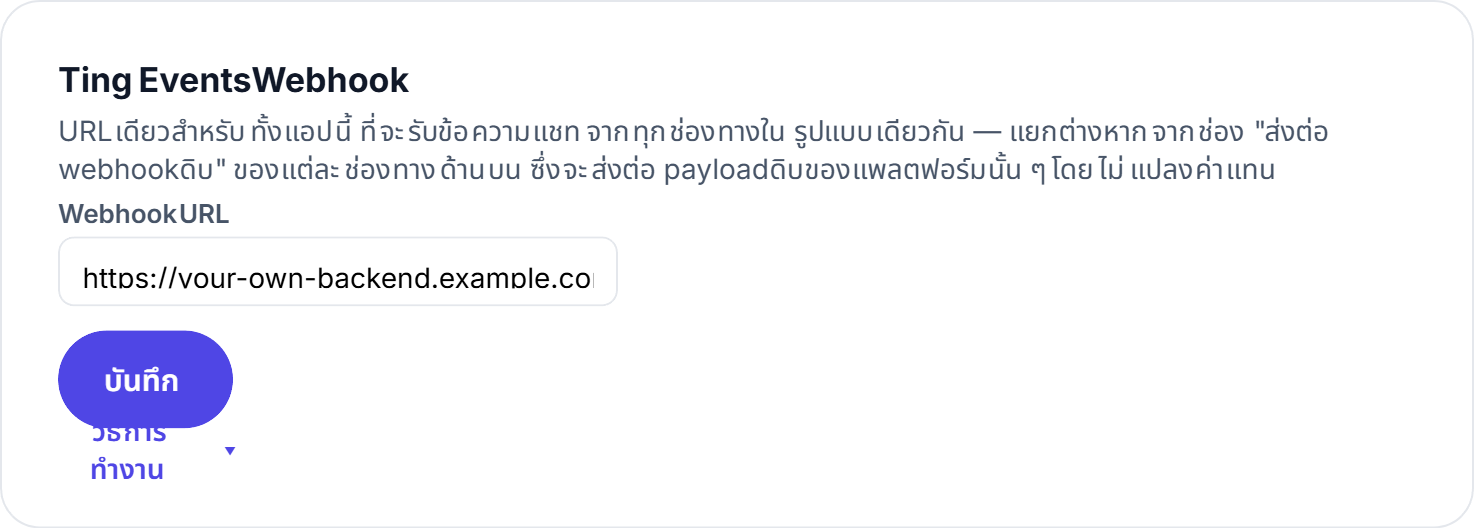
Configure one URL per app (Settings tab → "Ting Events Webhook") and Ting POSTs to it whenever a chat message comes in or goes out, or a new follower joins — whichever platform it came from — as the same normalized JSON, HMAC-signed so you can verify it's really from Ting.
| Header | Value | Description |
|---|---|---|
X-Ting-Event | message.received | message.sent | subscriber.joined | subscriber.linked | subscriber.updated | subscriber.expired | Which kind of event this is (same value as the body's event field). |
X-Ting-Signature | hex string | HMAC-SHA256 of the raw body, using your webhook secret — omitted if you haven't set a secret. |
Content-Type | application/json | The body is always JSON. |
| Event | Description |
|---|---|
message.received | A follower sent a message (from any channel) — data.conversation.externalId is who sent it, data.message.text is the text. |
message.sent | Ting delivered a message — from your /notify calls and from console replies alike. Use it to confirm delivery in real time. |
subscriber.joined | A brand-new follower joined (scanned the QR / tapped follow / messaged the bot for the first time) — data.subscriber.externalId + displayName let you greet them right away (see the recipe below). Fires only on the first join, never on a re-join. |
subscriber.linked | A Ting App follower opened a join link carrying ?ref=, e.g. https://ting.mawin.one/join/{code}?ref=table-12 — fires on every such open, whether or not they were already a follower (unlike subscriber.joined). data.ref is the value you put in the link and data.subscriber.userCode is their TNG code; use it to tie the follower to whatever the ref names — a table, an order, a signup (TingFood links customers to their table this way). |
subscriber.updated | A follower changed their display name — an update to an existing follower, not a new join; don't re-send a welcome for it. |
subscriber.expired | A follower's subscription expired (their configured expiry date has passed) — Ting checks daily at 01:00 Bangkok time and fires one event per follower, once. data.subscriber.expiresAt is when it lapsed; if the expiry is extended and lapses again, a new event fires. |
{
  "event": "message.received",
  "app": { "code": "M4rZTA260953", "name": "Demo Shop" },
  "channel": { "type": "LINE", "name": "LINE OA หลัก" },
  "platform": null,
  "data": {
    "conversation": { "externalId": "U4af4980629..." },
    "message": {
      "direction": "IN",
      "text": "สวัสดีครับ สินค้าชิ้นนี้ยังมีของไหม",
      "hasMedia": false,
      "mediaUrl": null,
      "answeredBy": null,
      "createdAt": "2026-09-04T07:12:33.000Z"
    }
  },
  "timestamp": "2026-09-04T07:12:33.100Z"
}{
"event": "subscriber.joined",
"app": { "code": "M4rZTA260953", "name": "Demo Shop" },
"channel": { "type": "TING", "name": "Ting Notifications" },
"platform": "ANDROID",
"data": {
"subscriber": {
"externalId": "3f0c2c1e-6b8a-4c1f-9c1e-8f2a9d0b7e21",
"displayName": "Nan",
"language": "th"
}
},
"timestamp": "2026-09-09T02:15:40.512Z"
}{
"event": "subscriber.expired",
"app": { "code": "M4rZTA260953", "name": "Demo Shop" },
"channel": { "type": "LINE", "name": "LINE Official" },
"data": {
"subscriber": {
"externalId": "U4af4980629d2c1b7f8e5a3c0b9d1e2f3",
"displayName": "Nan",
"expiresAt": "2026-09-08T17:00:00.000Z"
}
},
"timestamp": "2026-09-09T18:00:03.218Z"
}The code below is a ready-to-run server on your side: read the raw body → verify the HMAC → branch on the event type. Respond 200 as fast as you can and do the heavy work afterwards. Ting records every delivery on the console's Logs → Event Webhooks page for later inspection.
const express = require('express');
const crypto = require('crypto');

const app = express();
const SECRET = process.env.TING_WEBHOOK_SECRET;   // from Settings → Ting Events Webhook

// express.raw keeps the exact bytes Ting signed — do NOT use express.json() here
app.post('/ting/events', express.raw({ type: '*/*' }), (req, res) => {
  const expected = crypto.createHmac('sha256', SECRET).update(req.body).digest('hex');
  const given = req.get('X-Ting-Signature') ?? '';
  if (given.length !== expected.length || !crypto.timingSafeEqual(Buffer.from(given), Buffer.from(expected))) {
    return res.sendStatus(401);
  }

  const event = JSON.parse(req.body.toString('utf8'));
  switch (event.event) {
    case 'message.received':
      console.log(`[${event.channel.type}] ${event.data.conversation.externalId}: ${event.data.message.text}`);
      break;
    case 'message.sent':
      // delivery outcome of a /notify call or a console reply
      break;
    case 'subscriber.joined':
      console.log(`new follower ${event.data.subscriber.displayName} via ${event.channel.type}`);
      break;
  }
  res.sendStatus(200);   // answer quickly — do slow work after responding
});

app.listen(3000);
Verifying: compute an HMAC-SHA256 of the exact raw request body using your webhook secret, hex-encode it (lowercase), and compare to X-Ting-Signature in constant time — don't re-serialize the JSON first, since that can change the byte-for-byte body the signature was computed over.
A button a Ting Notifications follower taps that fires a webhook directly to your own endpoint — you never call an API for this, just configure it in the console and wait for the request to arrive.
| Header | Value | Description |
|---|---|---|
X-Ting-Signature | hex string | HMAC-SHA256 of the raw body, using the same signing secret as the Ting Events Webhook (see "Receive webhooks" above — one secret signs both, generated automatically the first time you save a command, even if you've never set an Events Webhook URL). Verify the same way: compute HMAC-SHA256 of the raw body with your secret and compare in constant time. |
Content-Type | application/json | Body is always JSON. |
HMAC-signed the same way as the Ting Events Webhook above (X-Ting-Signature header above) — this endpoint is just as internet-reachable as that one, so you can verify a call genuinely came from Ting rather than anyone who guesses the URL.
Verify the signature exactly the way you would for the Ting Events Webhook — see the full HMAC-check example in "Receive webhooks" above, and use the same secret.
{
  "userCode": "TNG3049182",
  "appName": "Demo Shop",
  "commandName": "cancelOrder",
  "commandLabel": "ยกเลิกออเดอร์",
  "language": "th",
  "platform": "ANDROID",
  "values": {
    "orderId": "1042",
    "reason": "Changed my mind",
    "urgent": true,
    "photo": "<TING_API_URL>/media/456",
    "where": { "lat": 13.7563, "lng": 100.5018 }
  }
}| Field | Type | Description |
|---|---|---|
userCode | string | The follower who tapped the command's own id ("TNG#######" format) — the same code shown on that follower's own profile screen. |
appName | string | The name of the app this command belongs to — useful if one endpoint backs commands on more than one of your apps. |
language | "th" | "en" | The language that follower has the app set to — use it to pick the language of your reply. |
values | object | What the follower filled in, keyed by the parameter names you configured. A checkbox sends a real boolean, decimal/rating send a number (rating is an integer 1-5), multiselect sends an array of strings, camera/image/video/file/signature send the uploaded file's URL, location sends { lat, lng }; every other type (including scan) sends a string — any type can be null if it wasn't required and was left blank. |
stringText (sent as a string)textareaMulti-line text (sent as a string)intNumber (sent as a string)decimalDecimal number (sent as a number, e.g. 199.5)phonePhone number (sent as a string, loosely validated)emailEmail (sent as a string)dateDate (sent as a string)timeTime (sent as a string, HH:mm)datetimeDate & time (sent as an ISO8601 string, e.g. 2026-09-16T14:30:00.000)checkboxCheckbox (sent as a real boolean)radioA predefined choice (sends the chosen option's value as a string)selectDropdown (sends the chosen option's value as a string, null if not required and nothing was picked)multiselectMulti-select (sends an array of strings in option order, [] if nothing was ticked)ratingStar rating 1-5 (sent as an integer 1 to 5)scanScan a QR code or barcode (sent as the decoded string)cameraTake a photo with the camera (sent as an image URL)imagePick an image from the device (sent as an image URL)videoVideo (sent as a video URL)fileA document — PDF/Word/Excel (sent as a file URL)signatureSignature (sent as a PNG image URL)locationCurrent GPS position (sent as { lat, lng })HTTP 2xx = success. The response body (up to 500 characters) is shown to the follower as a short toast right away — answer with "ok" or a short sentence, never a URL or internal detail. To send a full result (an HTML card, an image), have the endpoint call /notify back to that follower instead — see the "check server status" recipe below.
HTTP/1.1 200 OK
Content-Type: text/plain; charset=utf-8

ok
Ting waits at most 30 seconds for your endpoint to respond — anything longer counts as failed, with no automatic retry. For long-running work, answer "ok" first and deliver the result afterwards via /notify.
Write your own HTML/CSS/JavaScript page in the console and let Ting host it — delivered into the Ting app as an iframe card that runs JavaScript in full (unlike a plain message card, which can't). Ideal for input forms, confirmation screens or any interactive UI, with no server of your own required.
The easy way: pick the page from the dropdown on the command form — Ting sets the endpoint to one of its own (of the form /api/pages/{appCode}/{slug}/send) and handles everything. Configuring through the API instead? Use the commandEndpoint value returned by the page management API (below) as the command's endpoint.
Pick "Custom" instead and it's a regular Command Ting (section 12): Ting POSTs to your endpoint with the params the follower filled in, and your endpoint can then send a page back via /notify (below) if it wants to.
Whenever Ting sends a page to someone, the link in the card is filled in for that person:
<TING_API_URL>/p/AbC123xyz/order-form?userCode=TNG3049182&command=confirmOrder&ts=1789540329&sig=9f2c1e…a41b| Parameter | Type | Description |
|---|---|---|
userCode | string | The receiving follower's code ("TNG#######" — the same code shown on their profile screen and sent in Command Ting payloads) |
command | string | Internal name of the command that caused this send — for a /notify send it's the agent value instead |
ts | number | When Ting issued this link (unix seconds) — use it to limit the link's age when verifying |
sig | string | HMAC-SHA256 (hex) of userCode|command|ts with the app's signing secret — have the page forward it to your server to prove the form was opened from a Ting-issued link (see "Verifying it came from Ting" below) |
Read them in the page's JavaScript and post the filled form to your own server:
const params = new URLSearchParams(location.search);
const userCode = params.get('userCode');   // "TNG3049182"
const command  = params.get('command');    // "confirmOrder"
const ts       = params.get('ts');         // "1789540329"  (unix seconds, when Ting issued the link)
const sig      = params.get('sig');        // HMAC-SHA256 hex — verified on YOUR server, never here

document.getElementById('form').addEventListener('submit', async (e) => {
  e.preventDefault();
  const data = Object.fromEntries(new FormData(e.target).entries());
  await fetch('https://your-server.com/api/submit', {
    method: 'POST',
    headers: { 'Content-Type': 'application/json' },
    body: JSON.stringify({ userCode, command, ts, sig, ...data }),
  });
});
The page runs on a sandboxed origin (the browser sends Origin: null) — your server must allow it via CORS (e.g. Access-Control-Allow-Origin: *) or the browser blocks the fetch.
When the user is finished on your page (form submitted, order confirmed, and so on), link to tingapp://close. The Ting App closes the page and drops them back in the conversation they came from, instead of leaving them to find the back arrow. In an ordinary browser the link does nothing, so it's always safe to include.
<a href="tingapp://close">ปิด</a>For sends that aren't a reaction to a tap — no card HTML to write, just name the page and Ting composes the iframe card, filling in each recipient's userCode. Every other /notify field (delaySeconds, includeExpired, ...) works as usual.
POST <TING_API_URL>/apps/v1/notify
X-Ting-Api-Token: tapp_xxxxxxxxxxxxxxxx
Content-Type: application/json

{
  "page": "order-form",
  "message": "กรุณากรอกฟอร์มยืนยันคำสั่งซื้อ",
  "pageHeight": 420,
  "channels": ["TING"],
  "recipients": { "TING": ["TNG3049182"] }
}| Field | Type | Description |
|---|---|---|
page | string | Slug of a page in this app — an unknown slug returns 400 PAGE_NOT_FOUND |
message | string (optional) | A short line shown above the iframe — omit for the page alone |
pageHeight | number (optional) | Height of the iframe inside the card, px (200–1200, default 420) |
channels | string[] | Use ["TING"] — pages only render inside the Ting Notifications app; other channels just get the text |
If your endpoint composes the card HTML itself, these placeholders are filled in per recipient at send time (Ting Notifications channel only); the values are HTML-encoded.
| Placeholder | Description |
|---|---|
{{userCode}} | The receiving follower's code |
{{command}} | The command that fired (or the send's agent) |
{{ts}} | When the card was issued (unix seconds) |
{{signature}} | HMAC-SHA256 of userCode|command|ts, per recipient |
<div data-ting-height="420" style="background:#fff;border-radius:16px;padding:8px;">
  <iframe src="<TING_API_URL>/p/AbC123xyz/order-form?userCode={{userCode}}&command={{command}}&ts={{ts}}&sig={{signature}}"
          style="display:block;width:100%;height:400px;border:0;border-radius:12px;"></iframe>
</div>Every page link Ting sends out carries ts and sig. Have the page forward userCode, command, ts and sig along with the form data, and recompute the HMAC on your server with the app's signing secret (the same one X-Ting-Signature uses — app details → Settings → Ting Events Webhook). A match proves Ting issued this link for that follower, rather than someone guessing the URL:
sig = HMAC-SHA256( secret, userCode + "|" + command + "|" + ts )   → lowercase hex

secret   = Signing secret ของแอป (Settings → Ting Events Webhook — ตัวเดียวกับที่ใช้ตรวจ X-Ting-Signature)
example = HMAC-SHA256( secret, "TNG3049182|confirmOrder|1789540329" )const crypto = require('crypto');
function verifyTingPage({ userCode, command, ts, sig }, secret, maxAgeSeconds = 3600) {
const expected = crypto.createHmac('sha256', secret)
.update(`${userCode}|${command}|${ts}`)
.digest('hex');
const fresh = Math.abs(Date.now() / 1000 - Number(ts)) <= maxAgeSeconds;
return fresh && sig.length === expected.length &&
crypto.timingSafeEqual(Buffer.from(sig, 'hex'), Buffer.from(expected, 'hex'));
}
app.post('/api/submit', (req, res) => {
if (!verifyTingPage(req.body, process.env.TING_SIGNING_SECRET)) {
return res.status(401).json({ error: 'not from Ting' });
}
// req.body.userCode is now trusted — save the form
res.json({ ok: true });
});Verify on your server only — never put the secret in page code (pages are public) — and cap the age via ts (e.g. 1 hour) so an old link can't be replayed. An app that has no signing secret yet (an older app that never set one) gets an empty sig — open the app's Settings once and the system generates it.
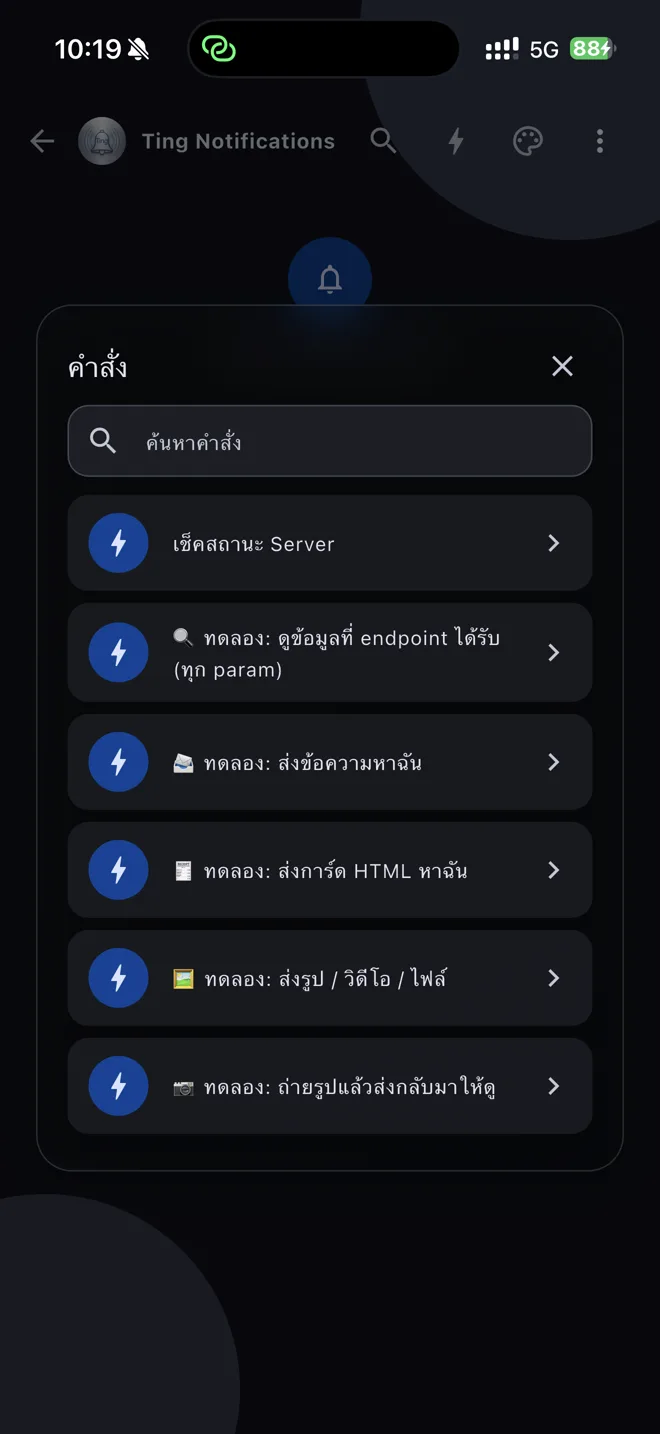
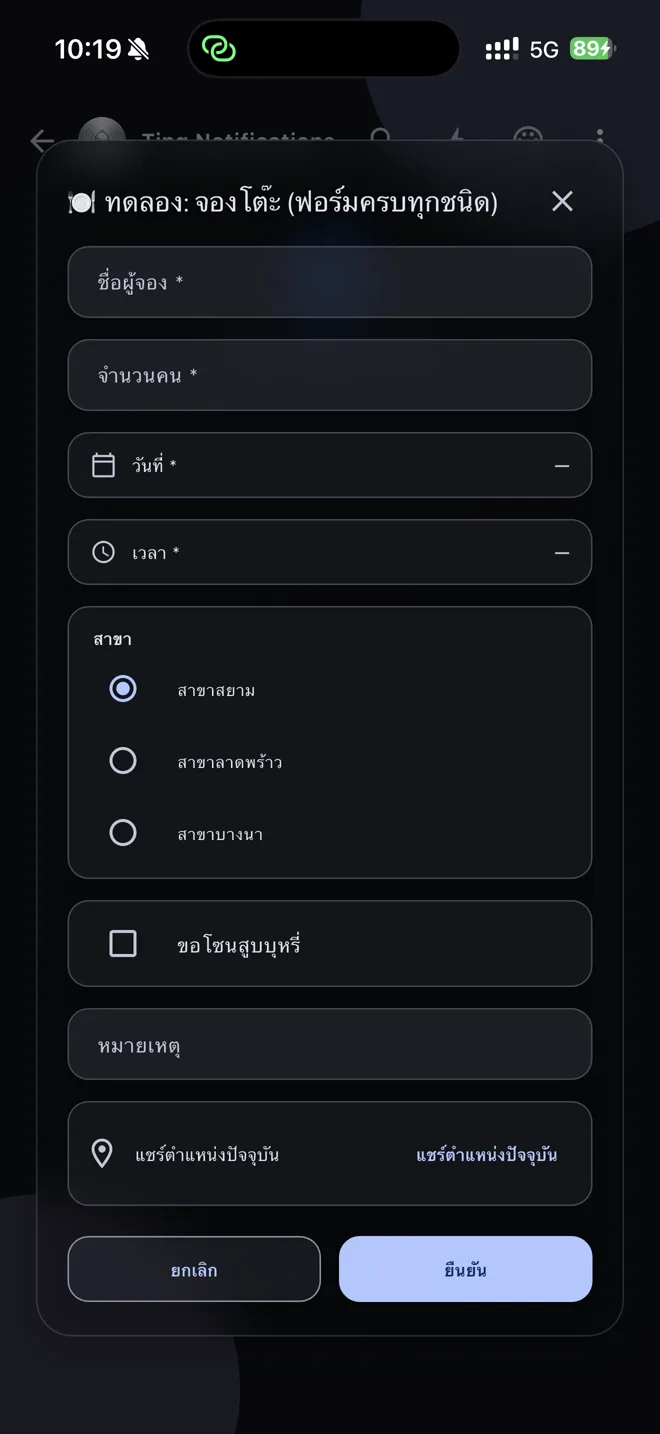
The "Ting Notifications" app inside the Ting Notifications carries 9 demo commands wired to a live example endpoint — tap them to see exactly what each param type delivers to your endpoint, and every way an endpoint can answer. The code behind the most complete one is below, written the way you would write it for real.
| Command | Params to fill in | What the endpoint does | What you get back |
|---|---|---|---|
| 🔍 Demo: show what the endpoint received | All 11 types — string, int, date, time, checkbox, radio, camera, image, video, file, location (all optional) | Nothing but echo the payload it received | The raw payload JSON + the X-Ting-Signature header value, shown in the command sheet |
| 📨 Demo: message me | message (string) | Calls /notify to the tapping follower with recipients.TING: [userCode] | One plain-text notification |
| 🧾 Demo: send me an HTML card | — | Calls /notify with an HTML message (inline styles + data-ting-height) | An order-confirmation card |
| 🖼️ Demo: send image / video / file | kind (radio: IMAGE / VIDEO / FILE) | Calls /notify with a public mediaUrl + mediaType | A notification with an image, a video or a PDF attached |
| 📷 Demo: take a photo, get it back | photo (camera), note (string) | The app uploads the photo first, so values.photo is already a URL — the endpoint sends it back as mediaUrl | The photo you just took, as a notification |
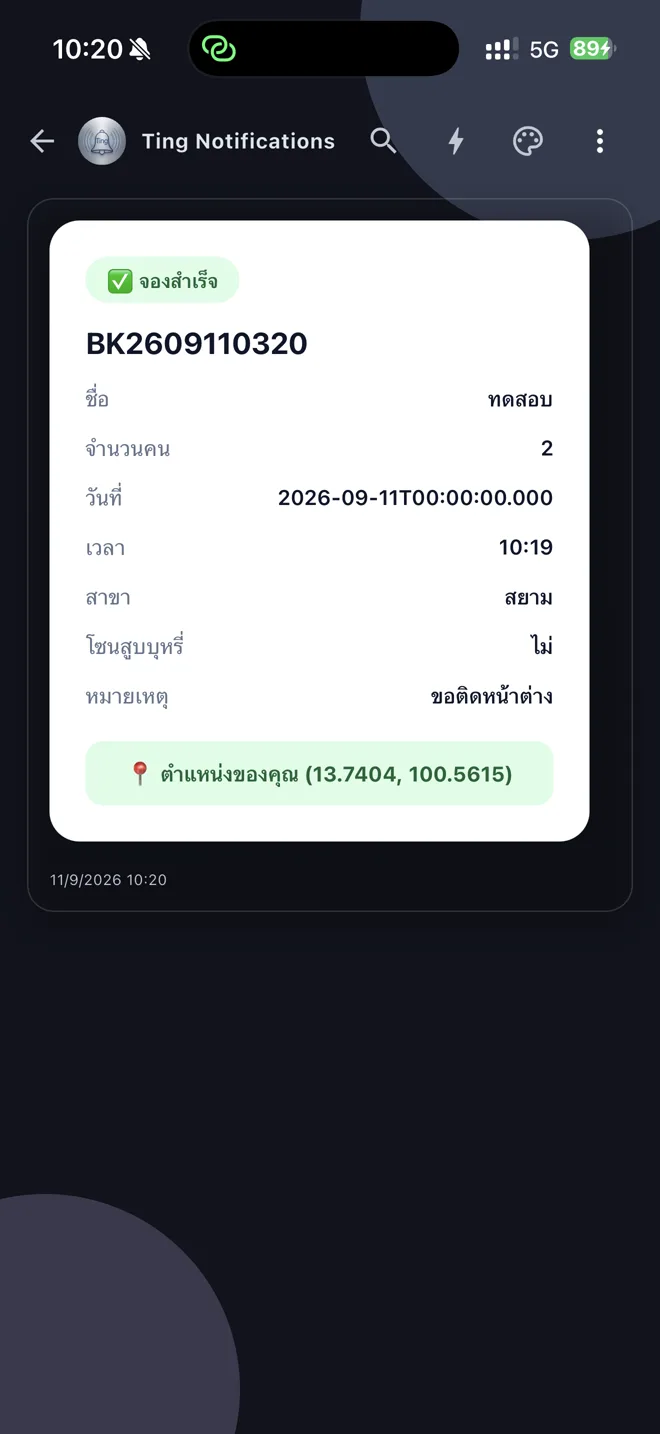
| 🍽️ Demo: table booking (every field type) | name (string), guests (int), date, time, branch (radio), smoking (checkbox), note (string), location | Reads each value in its real shape — int as a number, checkbox as a boolean, date as ISO 8601 ("2026-09-11T00:00:00.000"), time "HH:mm", location {lat, lng} — and builds a confirmation card | A booking card + Google Maps link from the location, and the received values shown in the command sheet |
| ⏰ Demo: schedule a message | minutes (radio: 1 / 5 / 30), message (string) | Calls /notify with a delay — Ting's queue sends it when due, no timer on your side | A notification that arrives when the time is up |
| 💥 Demo: simulate a broken endpoint (HTTP 500) | — | Answers HTTP 500 | The app shows the command as failed, with the status code and the endpoint's message |
| 🖥️ Demo: iframe card (a real clock + tap counter) | — | Calls /notify with an HTML message containing <iframe src="..."> embedding a tiny page with its own JavaScript | A card with a clock that actually ticks and a button that actually counts — unlike a plain HTML card, which can't run scripts at all (the WebView has JS off); the iframe's content is a separate document where JS runs normally |
The 9 demo endpoints live at https://api.mawin.one/api/demo/commands/{joinCode}/{action} with action = echo, text, card, media, photo, booking, schedule, fail, iframe — bound to the Ting Notifications app only, so they can't be called from elsewhere (signature won't match).
One server with all 9 endpoints — the same code the in-app commands actually call, written the way you would write it yourself, ready to copy as a starting point (X-Ting-Signature verification is identical to the "Receive Webhooks" section above and omitted here for readability).
const express = require('express');
const app = express();
app.use(express.json());
const TING_API = '<TING_API_URL>';
const TING_TOKEN = process.env.TING_API_TOKEN; // tapp_...
const SAMPLES = 'https://ting.mawin.one/demo'; // any publicly fetchable URL works
const esc = (s) => String(s ?? '').replace(/[&<>"]/g, (c) => ({ '&': '&', '<': '<', '>': '>', '"': '"' }[c]));
// One call to /notify — to the follower who tapped (recipients), or everyone
// in the room when recipients is omitted. Extra fields (mediaUrl, mediaType,
// delaySeconds) are passed straight through.
async function notify(body, userCode) {
const res = await fetch(`${TING_API}/apps/v1/notify`, {
method: 'POST',
headers: { 'X-Ting-Api-Token': TING_TOKEN, 'Content-Type': 'application/json' },
body: JSON.stringify({ channels: ['TING'], ...(userCode ? { recipients: { TING: [userCode] } } : {}), ...body }),
});
return res.json(); // { success, sendLogId }
}
const reply = (res, text) => res.type('text/plain').send(text);
// 1. echo — answer with exactly what arrived (every param type, all optional)
app.post('/ting/demo/echo', (req, res) => {
reply(res, 'Received:\n' + JSON.stringify(req.body, null, 2) + '\nX-Ting-Signature: ' + req.get('X-Ting-Signature'));
});
// 2. text — one string param in, one plain notification back to the tapper
app.post('/ting/demo/text', async (req, res) => {
const { userCode, values } = req.body;
await notify({ message: `📨 ${values.message}` }, userCode);
reply(res, 'Sent — check this room\'s notifications');
});
// 3. card — an HTML body (inline styles only, JS is off in the app's WebView; data-ting-height sizes it)
app.post('/ting/demo/card', async (req, res) => {
const { userCode, language } = req.body;
const en = language === 'en';
const card = `
<div data-ting-height="300" style="padding:24px;border-radius:20px;background:#fff;font-family:sans-serif;color:#0f172a;">
<span style="padding:6px 14px;border-radius:999px;font-weight:700;font-size:13px;background:#dbeafe;color:#1d4ed8;">${en ? 'HTML card' : 'การ์ด HTML'}</span>
<h2 style="font-size:20px;margin:14px 0 6px;">${en ? 'Order #1042 confirmed' : 'ยืนยันออเดอร์ #1042'}</h2>
<table style="width:100%;border-collapse:collapse;font-size:14px;">
<tr><td style="color:#64748b;padding:6px 0;">${en ? 'Item' : 'รายการ'}</td><td style="text-align:right;font-weight:600;">Latte × 2</td></tr>
<tr><td style="color:#64748b;padding:6px 0;">${en ? 'Total' : 'ยอดรวม'}</td><td style="text-align:right;font-weight:600;">฿130</td></tr>
</table>
<a href="https://ting.mawin.one" style="display:block;margin-top:16px;text-align:center;padding:12px 0;border-radius:12px;background:#0f172a;color:#fff;font-weight:700;text-decoration:none;">${en ? 'Open website' : 'เปิดเว็บไซต์'}</a>
</div>`;
await notify({ message: card }, userCode);
reply(res, en ? 'Card sent' : 'ส่งการ์ดแล้ว');
});
// 4. media — a public mediaUrl + mediaType (IMAGE | VIDEO | FILE); Ting downloads and attaches it
app.post('/ting/demo/media', async (req, res) => {
const { userCode, values } = req.body;
const kind = values.kind; // radio -> "IMAGE" | "VIDEO" | "FILE"
const file = { IMAGE: 'sample.jpg', VIDEO: 'sample.mp4', FILE: 'sample.pdf' }[kind];
await notify({ message: `Sample ${kind.toLowerCase()}`, mediaUrl: `${SAMPLES}/${file}`, mediaType: kind }, userCode);
reply(res, `Sent ${kind}`);
});
// 5. photo — camera/image params arrive as a URL the app already uploaded; send it straight back
app.post('/ting/demo/photo', async (req, res) => {
const { userCode, values } = req.body;
if (!values.photo) return reply(res, 'No photo attached');
await notify({ message: `📷 ${values.note || 'Your photo'}`, mediaUrl: values.photo, mediaType: 'IMAGE' }, userCode);
reply(res, 'Photo sent back: ' + values.photo);
});
// 6. booking — every scalar type + location, turned into a confirmation card
app.post('/ting/demo/booking', async (req, res) => {
const { userCode, language, values } = req.body;
const en = language === 'en';
const name = values.name; // string
const guests = values.guests; // int -> number
const date = values.date.slice(0, 10); // date -> "2026-09-12T00:00:00.000" (ISO 8601)
const time = values.time; // time -> "19:00"
const branch = values.branch; // radio -> the chosen option's value
const smoking = values.smoking === true; // checkbox -> boolean
const note = values.note ?? ''; // optional -> missing when left blank
const loc = values.location; // location -> { lat, lng } | undefined
const bookingNo = 'BK' + Date.now().toString().slice(-8);
const row = (k, v) => `<tr><td style="padding:6px 0;color:#64748b;">${k}</td><td style="padding:6px 0;text-align:right;font-weight:600;">${esc(v)}</td></tr>`;
const card = `
<div data-ting-height="${loc ? 420 : 360}" style="padding:24px;border-radius:20px;background:#fff;font-family:sans-serif;color:#0f172a;">
<span style="padding:6px 14px;border-radius:999px;font-weight:700;background:#dcfce7;color:#166534;">✅ ${en ? 'Booking confirmed' : 'จองสำเร็จ'}</span>
<h2 style="margin:14px 0 4px;">${bookingNo}</h2>
<table style="width:100%;border-collapse:collapse;font-size:14px;">
${row(en ? 'Name' : 'ชื่อ', name)}${row(en ? 'Guests' : 'จำนวนคน', guests)}
${row(en ? 'Date' : 'วันที่', date)}${row(en ? 'Time' : 'เวลา', time)}
${row(en ? 'Branch' : 'สาขา', branch)}${row(en ? 'Smoking area' : 'โซนสูบบุหรี่', smoking ? '✓' : '✗')}
${note ? row(en ? 'Note' : 'หมายเหตุ', note) : ''}
</table>
${loc ? `<a href="https://www.google.com/maps?q=${loc.lat},${loc.lng}" style="display:block;margin-top:14px;text-align:center;padding:11px 0;border-radius:12px;background:#dcfce7;color:#166534;font-weight:700;text-decoration:none;">📍 ${en ? 'Your location' : 'ตำแหน่งของคุณ'}</a>` : ''}
</div>`;
await notify({ message: card }, userCode);
reply(res, (en ? `Booking ${bookingNo} confirmed` : `จอง ${bookingNo} สำเร็จ`) + '\n\nvalues:\n' + JSON.stringify(values, null, 2));
});
// 7. schedule — delaySeconds holds the send in Ting's queue; no timer on your side
app.post('/ting/demo/schedule', async (req, res) => {
const { userCode, values } = req.body;
const minutes = Number(values.minutes); // radio -> "1" | "5" | "30"
await notify({ message: `⏰ ${values.message || "Time's up!"}`, delaySeconds: minutes * 60 }, userCode);
reply(res, `Scheduled — arrives in ${minutes} min`);
});
// 8. fail — any non-2xx shows in the app as a failed command, with this text
app.post('/ting/demo/fail', (req, res) => {
res.status(500).type('text/plain').send('Simulated failure: backend is down');
});
// 9. iframe — the card's own HTML has JS off (see "card" above), but an
// <iframe src="..."> loads a separate page, so THAT page's JavaScript
// runs fine — use this for a live widget, a map, or a small tool page
// instead of a static card.
app.post('/ting/demo/iframe', async (req, res) => {
const { userCode } = req.body;
const card = `
<div data-ting-height="260" style="padding:12px;border-radius:20px;background:#fff;">
<iframe src="https://your-site.com/live-widget" style="display:block;width:100%;height:236px;border:0;border-radius:12px;"></iframe>
</div>`;
await notify({ message: card }, userCode);
reply(res, 'iframe card sent');
});
app.listen(3000);Both of these run for real on our own "Ting Notifications" app — the images below are actual phone screenshots, not mockups. Drop the code on your server, swap in your token and URL, and they work as-is.
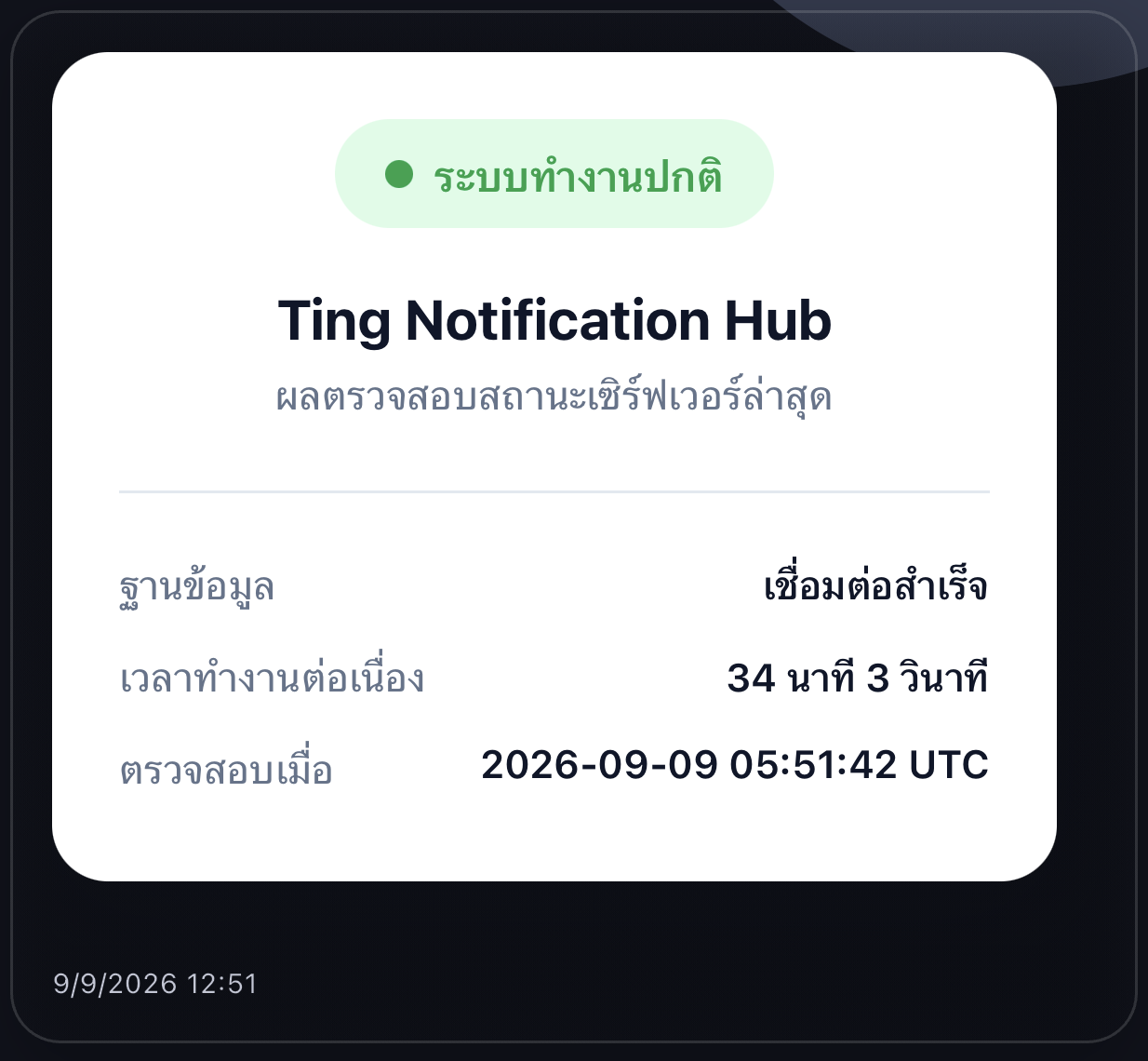
A follower taps "Check server status" in the Ting Notifications → Ting POSTs to your endpoint → the endpoint checks its own systems and pushes a status card (HTML) back to that one follower via /notify — all within a few seconds, without the follower typing anything.
Actual screen in the Ting Notifications
const express = require('express');

const app = express();
app.use(express.json());

const TING_API = '<TING_API_URL>';
const TING_TOKEN = process.env.TING_API_TOKEN;   // tapp_...

app.post('/ting/commands/check-status', async (req, res) => {
  const { userCode, appName, language, values } = req.body;

  // 1. Run your own checks
  const dbOk = await checkDatabase();
  const uptimeMin = Math.floor(process.uptime() / 60);

  // 2. Push a rich status card back to the follower who tapped the command
  const ok = dbOk;
  const title = language === 'en'
    ? (ok ? 'All systems normal' : 'Problem detected')
    : (ok ? 'ระบบทำงานปกติ' : 'ระบบมีปัญหา');
  const card = `
<div data-ting-height="230" style="padding:20px;border-radius:16px;background:#fff;font-family:sans-serif;text-align:center;">
  <span style="padding:6px 16px;border-radius:999px;font-weight:700;background:${ok ? '#dcfce7' : '#fee2e2'};color:${ok ? '#16a34a' : '#dc2626'};">${title}</span>
  <h3 style="margin:16px 0 4px;">${appName}</h3>
  <p style="margin:0;color:#64748b;font-size:14px;">Database: ${dbOk ? 'OK' : 'DOWN'} · Uptime: ${uptimeMin} min</p>
</div>`;

  await fetch(`${TING_API}/apps/v1/notify`, {
    method: 'POST',
    headers: { 'X-Ting-Api-Token': TING_TOKEN, 'Content-Type': 'application/json' },
    body: JSON.stringify({
      message: card,
      channels: ['TING'],
      recipients: { TING: [userCode] },
    }),
  });

  // 3. Short acknowledgement — shown to the follower as a toast (max 500 chars)
  res.type('text/plain').send('ok');
});

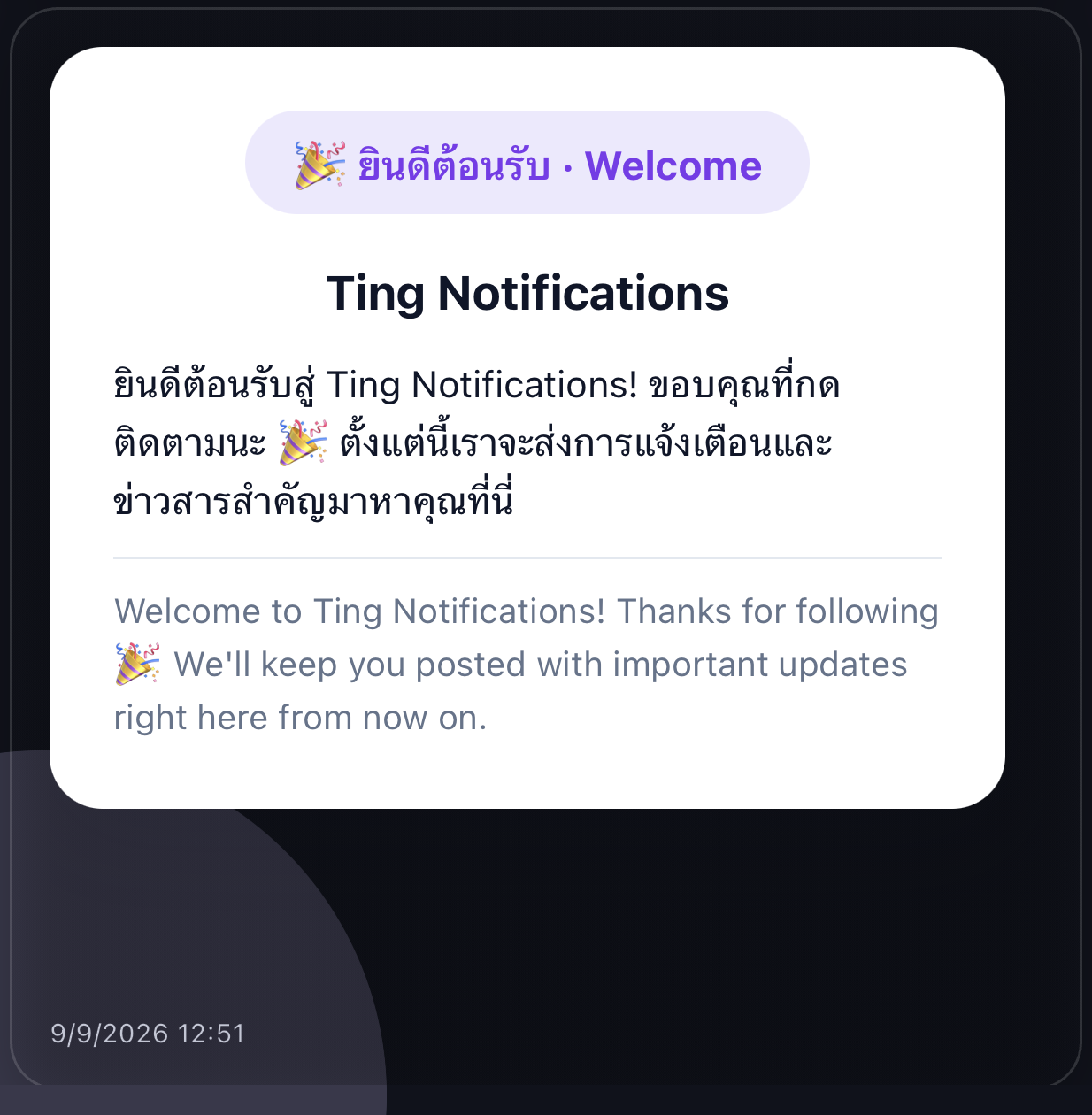
app.listen(3000);Every time someone follows your app for the first time, Ting sends a "subscriber.joined" event to your webhook — the code below sends a bilingual welcome back to that one person, on the channel they joined through (an HTML card from the Ting Notifications, plain text from LINE/Telegram/others).
The push arrives the moment they follow

Actual screen in the Ting Notifications
const TING_API = '<TING_API_URL>';
const TING_TOKEN = process.env.TING_API_TOKEN;   // tapp_...

function greeting(appName, name, richHtml) {
  const who = name ? ` คุณ${name}` : '';
  const whoEn = name ? `, ${name},` : '';
  const th = `ยินดีต้อนรับ${who} สู่ ${appName}! ขอบคุณที่กดติดตามนะ 🎉 ตั้งแต่นี้เราจะส่งการแจ้งเตือนและข่าวสารสำคัญมาหาคุณที่นี่`;
  const en = `Welcome${whoEn} to ${appName}! Thanks for following 🎉 We'll keep you posted with important updates right here from now on.`;
  if (!richHtml) return `${th}\n\n${en}`;   // LINE/Telegram/...: plain text
  return `
<div data-ting-height="360" style="padding:24px;border-radius:20px;background:#fff;font-family:sans-serif;text-align:center;">
  <span style="padding:8px 18px;border-radius:999px;font-weight:700;background:#ede9fe;color:#7c3aed;">🎉 ยินดีต้อนรับ · Welcome</span>
  <h3 style="margin:18px 0 12px;">${appName}</h3>
  <p style="text-align:left;font-size:14px;line-height:1.6;margin:0 0 10px;">${th}</p>
  <p style="text-align:left;font-size:13px;line-height:1.6;margin:0;color:#64748b;border-top:1px solid #e2e8f0;padding-top:10px;">${en}</p>
</div>`;
}

// call this from the 'subscriber.joined' branch of your /ting/events handler
async function sendWelcome(event) {
  const { type } = event.channel;
  const { externalId, displayName } = event.data.subscriber;

  await fetch(`${TING_API}/apps/v1/notify`, {
    method: 'POST',
    headers: { 'X-Ting-Api-Token': TING_TOKEN, 'Content-Type': 'application/json' },
    body: JSON.stringify({
      message: greeting(event.app.name, displayName, type === 'TING'),
      channels: [type],
      recipients: { [type]: [externalId] },   // only the person who just joined
    }),
  });
}
Caution: whatever your endpoint returns to Ting (Command Ting and webhooks alike) is never shown to followers beyond a short toast, but still never put URLs, tokens or internal details in it — keep your Ting token in a server-side environment variable only, never in a mobile app or a web page users can reach.
Every channel's own setup section has its own "Forward raw webhook" field. Paste a URL there and Ting relays the exact, unconverted body and headers it received from that platform — LINE, Telegram, Discord, and the rest — to your backend in parallel, signature headers included. Reach for this when you'd rather parse each platform's native format yourself; reach for the unified events webhook above when you want one shape for everything.
14 days free, full API access, no credit card required