Message guide

See what your messages will look like — before you send

Write a message once and Ting converts it to what each platform can actually render; on the Ting Notifications you design cards with full HTML/CSS like a web page. This page has ready-to-copy templates and a live playground.

Messages come in three levels — pick one per channel

The same message field in the API accepts all three. Ting detects which one you sent; there's nothing to configure.

1

Plain text

Whatever you type is delivered as-is to every channel. Links become clickable wherever the app supports it — right for short alerts that just need to arrive.

Every channel
message
สินค้าที่คุณสั่งจัดส่งแล้ว 🚚
ติดตามพัสดุได้ที่ https://shop.example.com/track/1042

สินค้าที่คุณสั่งจัดส่งแล้ว 🚚
ติดตามพัสดุได้ที่ https://shop.example.com/track/1042
2

A card from a few simple tags

Add a handful of <img> <h3> <b> <button> tags and Ting turns it into a real Flex Message on LINE, an image + tappable buttons on Telegram, Block Kit on Slack and an embed on Discord — all from the one message you wrote.

Every channel — converted automatically
message
<img src="https://cdn.example.com/tshirt.jpg">
<h3>เสื้อยืดสีขาว</h3>
<p>ราคา <b>350 บาท</b><i>ส่งฟรี</i></p>
<button href="https://shop.example.com/buy">สั่งซื้อ</button>
<button href="https://shop.example.com/detail">ดูรายละเอียด</button>
เสื้อยืดสีขาวราคา 350 บาทส่งฟรี
What LINE gets
3

Full HTML/CSS

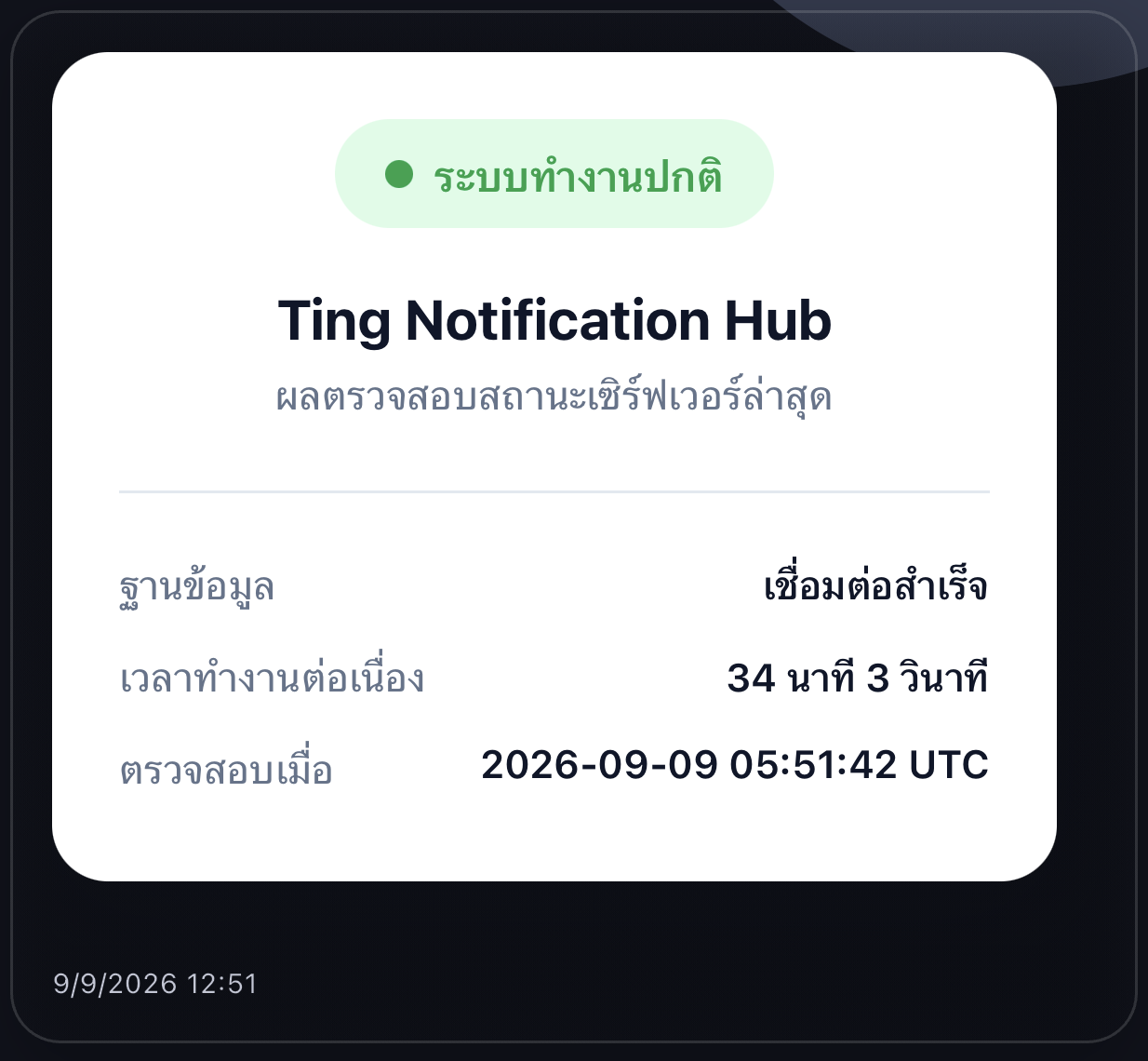
Followers on the Ting Notifications see your card rendered in a real WebView — gradients, shadows, rounded corners, flexbox, product carousels, timelines, receipts: anything a web page can do. The image on the right is a real phone screenshot.

Ting Notifications only (TING)
The server status card as actually shown in the Ting Notifications

Ready-made templates — copy, tweak, send

Six cards businesses send most — pick one, see it rendered in a phone frame, copy the HTML and send it through the API or the console's Test-send page right away (swap in your own copy, colors and links).

What the follower sees in the Ting Notifications

Ting Notifications
🎉 โปรโมชั่นวันนี้เท่านั้น

ลดสูงสุด 20%

ทุกรายการในร้าน พร้อมส่งฟรีทั่วประเทศ ใช้โค้ด TING20 ก่อนเที่ยงคืนนี้

ช้อปเลย
9/9/2026 12:51

A gradient card with a discount code and a shop button — for flash sales or announcing a new promo.

message (HTML)
<div data-ting-height="300" style="font-family:-apple-system,BlinkMacSystemFont,'Segoe UI',Roboto,'Noto Sans Thai',sans-serif;border-radius:20px;overflow:hidden;background:linear-gradient(135deg,#4f46e5,#7c6cf0);color:#fff;padding:24px;">
  <span style="display:inline-block;padding:6px 14px;border-radius:999px;background:rgba(255,255,255,0.18);font-size:13px;font-weight:700;">🎉 โปรโมชั่นวันนี้เท่านั้น</span>
  <h2 style="margin:16px 0 8px;font-size:24px;line-height:1.2;">ลดสูงสุด 20%</h2>
  <p style="margin:0 0 18px;font-size:14px;line-height:1.6;opacity:0.9;">ทุกรายการในร้าน พร้อมส่งฟรีทั่วประเทศ ใช้โค้ด <b>TING20</b> ก่อนเที่ยงคืนนี้</p>
  <a href="https://shop.example.com/sale" style="display:block;padding:12px;border-radius:999px;background:#fff;color:#4f46e5;text-align:center;font-weight:700;text-decoration:none;">ช้อปเลย</a>
</div>

Send this template through the API

curl
curl -X POST <TING_API_URL>/apps/v1/notify \
  -H "X-Ting-Api-Token: tapp_xxxxxxxxxxxxxxxxxxxxxxxxxxxxxxxxxxxxxxx" \
  -H "Content-Type: application/json" \
  -d '{ "message": "<div data-ting-height=\"300\" style=\"font-family:-apple-system,BlinkMacSystemFont,'\''Segoe UI'\'',Roboto,'\''Noto Sans Thai'\'',sans-serif;border-radius:20px;overflow:hidden;background:linear-gradient(135deg,#4f46e5,#7c6cf0);color:#fff;padding:24px;\"><span style=\"display:inline-block;padding:6px 14px;border-radius:999px;background:rgba(255,255,255,0.18);font-size:13px;font-weight:700;\">🎉 โปรโมชั่นวันนี้เท่านั้น</span><h2 style=\"margin:16px 0 8px;font-size:24px;line-height:1.2;\">ลดสูงสุด 20%</h2><p style=\"margin:0 0 18px;font-size:14px;line-height:1.6;opacity:0.9;\">ทุกรายการในร้าน พร้อมส่งฟรีทั่วประเทศ ใช้โค้ด <b>TING20</b> ก่อนเที่ยงคืนนี้</p><a href=\"https://shop.example.com/sale\" style=\"display:block;padding:12px;border-radius:999px;background:#fff;color:#4f46e5;text-align:center;font-weight:700;text-decoration:none;\">ช้อปเลย</a></div>", "channels": ["TING"] }'

Replace <TING_API_URL> and the token with the real values from your app's Settings tab — every other language (Node.js, PHP, Python, C#, Java, Go, Ruby) is on the API Reference; the body is identical everywhere.

Type HTML, see the result instantly

Edit the code on the left and the preview on the right updates live — nothing is actually sent, it's only a preview on this page. Happy with it? Copy it into the message field.

HTML code

What it looks like in the app

Ting Notifications
🎉 โปรโมชั่นวันนี้เท่านั้น

ลดสูงสุด 20%

ทุกรายการในร้าน พร้อมส่งฟรีทั่วประเทศ ใช้โค้ด TING20 ก่อนเที่ยงคืนนี้

ช้อปเลย
Ting Notifications

The Ting Notifications: a real WebView, not just a small tag set

A follower receiving through the Ting Notifications (channel type TING) isn't limited by the tag table above at all — the whole HTML message renders with a real on-device WebView, so nearly any CSS works (backgrounds, colors, shadows, rounded corners, flexbox), not just the small tag set above. The Ting Notifications-only features are:

Links open inside the app, not off in a browser

An http/https link in a message opens in the Ting App's own web view, so the reader never leaves the app and can get back to the conversation easily. Append ting_external to choose the behaviour · omitted or 0 — in-app only, with no way out to a browser at all; the view has no address bar, so the reader never sees your domain or endpoint (the default) · 1 or true — goes straight out to the real browser or another app, which is what an add-on-LINE link needs to reach the LINE app · 2 — opens in the app but offers an "open in browser" action, for pages whose destination isn't sensitive and that may need a real browser, such as a bank payment or a login flow · In every mode Ting strips the parameter before opening, so your destination never sees it. Non-web links such as tel: and mailto: always leave the app, with nothing to add.

HTML
<a href="https://example.com/status">View status (in-app, destination hidden)</a>
<a href="https://lin.ee/abcd?ting_external=1">Add on LINE (opens the LINE app)</a>
<a href="https://bank.example.com/pay?ting_external=2">Pay (in-app, with a browser action)</a>

A close button that returns to the conversation

When the reader is finished on your page — form submitted, order confirmed — link to tingapp://close. The Ting App closes the page and drops them back in the conversation they came from, instead of leaving them to find the back arrow. It's always safe to include: opened in an ordinary browser, the link simply does nothing.

HTML
<a href="tingapp://close">Close</a>

Choose whether messages render immediately or need a tap first

The app owner sets a default in the app's settings page ("auto-render HTML messages") for whether rich HTML should render the moment it scrolls into view, or stay a tap-to-view button until opened. Each follower can override that for themselves in the app too (tap the palette icon in the chat header) — a follower's own choice always wins over the app's default. While a message hasn't rendered yet, it stays hidden rather than flashing raw text first.

Embed a link (iframe) — opens full-screen, sandboxed

Write <iframe src="https://..."></iframe> in the message as normal — the Ting Notifications never embeds it as a real iframe inside the card (for safety); instead it becomes a "Embedded content — tap to view full screen" button. Tapping it opens a separate full-screen page that's allowed to run JavaScript (good for charts, maps, or interactive pages), completely isolated from the main message card with no bridge back to any app data — and cookies are cleared fresh every time it opens, so different embedded links never share a session.

HTML
<iframe src="https://your-dashboard.example.com/chart?id=123"></iframe>

Set the card's height yourself

By default the Ting Notifications estimates a card's height from its content (counting images, buttons, lines of text). To set it yourself instead, wrap the message in <div data-ting-height="420">…</div> — the number is a height in pixels (the console's Test-send page also offers a plain "height" field so you don't have to hand-write the attribute).

HTML
<div data-ting-height="420">...card content...</div>

Horizontal carousel

Wrap several cards in display:flex; overflow-x:auto; with each card given a fixed flex:0 0 … width — the Ting Notifications swipes through them horizontally without fighting the list's own vertical scroll. Good for showing several products in one message.

"Command Ting": a button that fires a webhook back to you

The app has a separate "Command Ting" tab from the notification feed — configure a command's name, target endpoint, and a param form (text, number, date, checkbox, or a set of choices) for the follower to fill in. A follower taps the Command button in the app, picks the command, fills in the form, and confirms — Ting POSTs the filled-in values to your endpoint automatically (with the follower's id and the app's name attached). Good for an "cancel order", "report a problem", or any other action you want a follower to be able to trigger without typing into a chat.

The phone's notification banner showing the welcome message
The phone's system push — Ting derives the preview text from the card for you
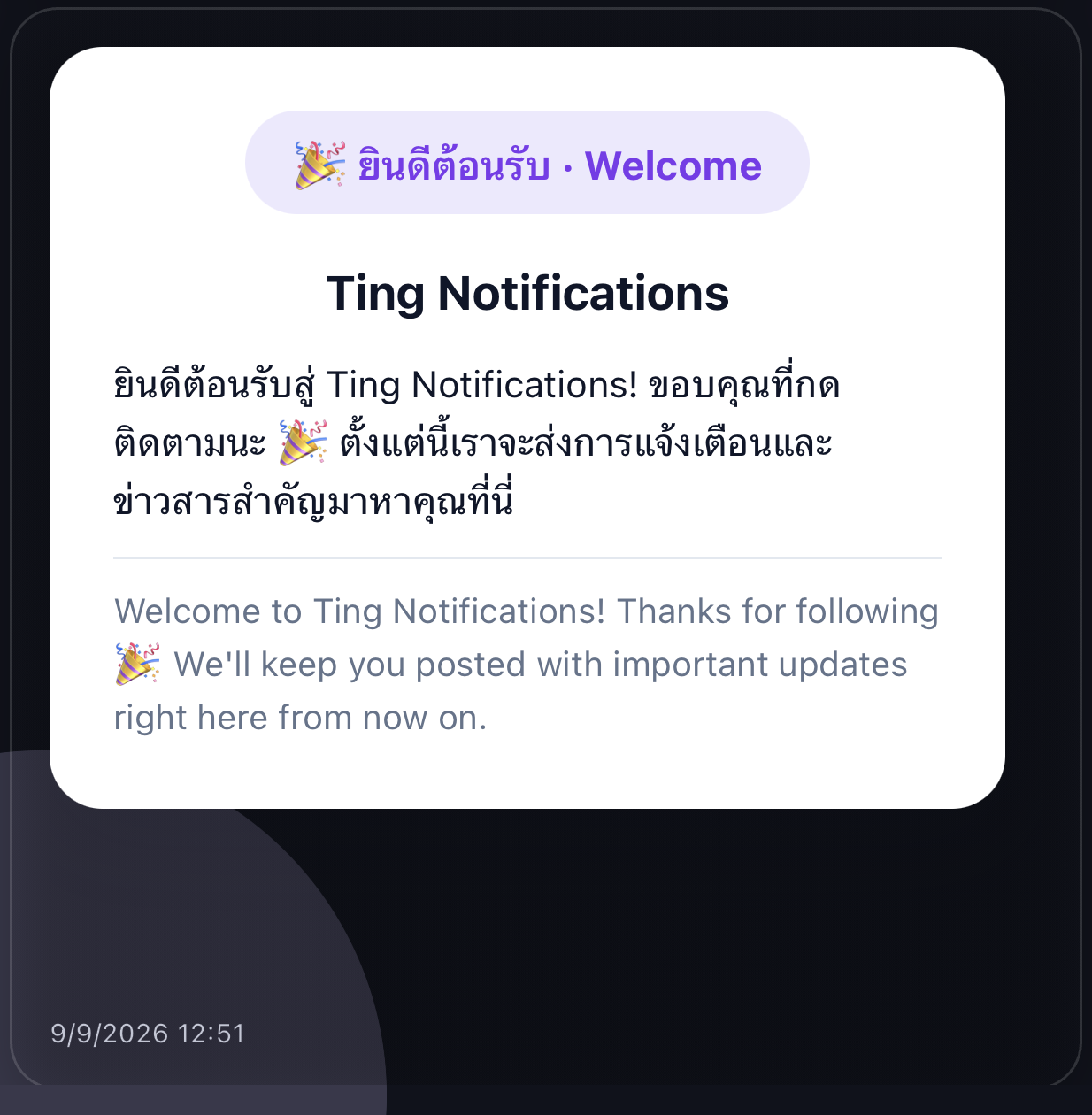
The welcome card as actually shown in the Ting Notifications
The bilingual welcome card — a real Ting Notifications screenshot

Tags that work everywhere, and what each platform can do

For level-2 messages — the small tag set Ting converts for every channel. The tables below say plainly which ones each platform can really show, so you never have to guess.

Can I use more than one button?

Yes. — Add as many <button> tags as you like. On LINE, Telegram and Slack — the three platforms with a real button UI — every one of them becomes an actual tappable button, in the order you wrote them: LINE stacks them vertically in the card's footer, Telegram gives each its own full-width row, and Slack lists them in an actions block. Discord and WhatsApp/Messenger can't render true interactive buttons through this integration (see Known limitations), so there each button after the first shows up as a plain "label: link" line instead of being dropped.

Supported tags

Anything else in the message is ignored as a tag but its text content is kept.

TagEffectNotes
<b> <strong>Bold
<i> <em>Italic
<u> <ins>UnderlineNo WhatsApp or Slack equivalent — dropped there, not substituted.
<s> <strike> <del>Strikethrough
<code>Monospace
<a href="…">LinkOnly LINE and Telegram can make the link text itself tappable; elsewhere the URL is appended after the text.
<br>Line break
<p> <div> <li>Line breakTreated purely as line separators — no list numbering/bullets, no box styling.
<h1>–<h6>Headingh1–h3 render large and bold; h4–h6 render medium and bold. No platform truly has "headings" — this is simulated with size/weight.
<img src="…">Card imageOnly the first image in the message is used — one image per message, no galleries.
<button href="…">Label</button>Call-to-action buttonUse as many as you need. <a href="…"><button>Label</button></a> also works. A button with no URL anywhere folds back into plain body text instead of being sent as a broken button.

Platform capabilities

What actually reaches the end user's screen, feature by feature.

LINETelegramDiscordSlackWhatsAppMessenger
Bold / italic / strike Yes Yes No flattened to plain text Yes Yes No flattened to plain text
Underline Yes Yes No No no mrkdwn syntax for it No no WhatsApp syntax for it No
Heading Yes larger, bold text Partial bold only, same size Yes embed title Partial bold only, same size Partial bold only No
Image Yes card hero image Yes real photo message Yes embed image Yes Block Kit image block Yes real image message No silently not sent
Multiple buttons Yes stacked, all tappable Yes one row each, all tappable Partial only 1st is a real link Yes actions block, all tappable No all become text links No all become text links
Clickable link text Yes Yes Partial title only Partial auto-linkified URL Partial auto-linkified URL Partial auto-linkified URL

How each platform renders it

Ting never sends HTML to a platform directly — it converts to each one's native format. This is what happens behind the scenes.

LINE

Flex Message

LINE has no HTML of its own, so the message becomes a real Flex Message — the same JSON structure you'd hand-author in LINE's own editor.

  • The image becomes the card's hero.
  • Each line of text becomes its own text block; headings render larger and bold.
  • Every button is stacked in the card's footer, in order, each a real tap target.
  • A line with mixed formatting (e.g. "normal <b>bold</b> normal") uses styled spans within one text block, so it still reads as a single line.
Telegram

HTML dialect + photo + inline keyboard

Telegram's Bot API supports its own restricted HTML for message text (parse_mode: HTML) — a much smaller tag set than real HTML, which is why Ting only offers the tags in the reference table above.

  • If there's an image, Ting switches from a plain text message to a photo message, with everything else as the caption (capped at 1024 characters by Telegram itself).
  • Every button becomes a real inline-keyboard row beneath the message — tapping one opens the URL directly in-app.
  • No image or buttons at all → sends exactly as before: a plain sendMessage call, HTML only if you used any formatting tags.
Discord

Embed

Sent through the Discord Webhook channel (Discord's own Incoming Webhook — no Developer Portal or bot needed), which supports rich "embeds" but not real interactive buttons.

  • The heading becomes the embed's title, the rest of the text becomes its description, and the image sits in the embed.
  • Only the first button's URL can be attached to the embed — it makes the title itself clickable.
  • Every button (including that first one) is also listed as "label: url" text inside the description, so none of them are lost even though only one is a real clickable title.
  • A separate Discord App channel can also send: it receives button clicks and slash commands through Discord's Interactions Endpoint (a bot token + Public Key, both from the same Discord application), and automatically remembers every channel that ever interacted with it — broadcast to all of them or pick specific ones on the Test send page, the same way Telegram's chat id is discovered.
Slack

Block Kit

Sent through a Slack Incoming Webhook as real Block Kit blocks, using Slack's own "mrkdwn" text syntax rather than HTML.

  • Formatting becomes *bold*, _italic_, ~strike~ and `code` — Slack's own mrkdwn, not HTML.
  • The image becomes its own image block.
  • Every button becomes a real, clickable button in an actions block — unlike Discord's webhook, Slack's button url field works without needing a full interactive-app backend, so nothing here falls back to a text link.
  • An Incoming Webhook always posts to the one channel it was created for — Ting can't retarget a send to a different channel per message (see Known limitations).
  • The same Slack app can also be set up to receive messages back — see the Slack channel's setup card on the application's page for the exact steps.
WhatsApp

Cloud API markdown

WhatsApp's own tiny non-HTML markdown, plus a real image message when there's a picture.

  • *bold*, _italic_, ~strike~, and triple-backtick monospace — WhatsApp's actual syntax, not HTML.
  • An image is sent as a real WhatsApp image message, with the rest of the text as its caption.
  • Buttons have no equivalent here at send time (real WhatsApp buttons require a pre-approved template message reviewed by Meta ahead of time) — each one becomes a bold label followed by its link, and WhatsApp auto-detects and links that URL for the recipient.
Messenger

Plain text

The basic Messenger Send API text message has no rich-text or attachment-plus-text support in this integration, so everything is flattened.

  • All formatting tags are stripped down to their plain text.
  • An image, if present, is not sent at all — Messenger needs a separate attachment message for that, which this endpoint doesn't send yet.
  • Each button becomes a "label: link" line; Messenger auto-links the URL.

Worked examples

The same message, sent once — what the recipient on each platform sees.

Plain text (no tags)

message
สินค้าที่คุณสั่งจัดส่งแล้ว ติดตามพัสดุได้ที่ลิงก์ด้านล่าง
LINE

Sent as a plain text message, unchanged.

Telegram

Sent as a plain text message, unchanged.

Discord

Sent as plain webhook content, unchanged.

Slack

Sent as plain webhook text, unchanged.

WhatsApp

Sent as a plain text message, unchanged.

Messenger

Sent as a plain text message, unchanged.

Inline formatting

message
<b>แจ้งเตือน</b>: ออเดอร์ #1024 <i>จัดส่งแล้ว</i>
LINE

One text block: แจ้งเตือน (bold): ออเดอร์ #1024 จัดส่งแล้ว (italic)

Telegram

Sent with parse_mode: HTML — bold and italic render natively.

Discord

Plain content: "แจ้งเตือน: ออเดอร์ #1024 จัดส่งแล้ว"

Slack

"*แจ้งเตือน*: ออเดอร์ #1024 _จัดส่งแล้ว_"

WhatsApp

"*แจ้งเตือน*: ออเดอร์ #1024 _จัดส่งแล้ว_"

Messenger

Plain: "แจ้งเตือน: ออเดอร์ #1024 จัดส่งแล้ว"

Product card — image, heading, price, two buttons

message
<img src="https://cdn.example.com/tshirt.jpg">
<h3>เสื้อยืดสีขาว</h3>
<p>ราคา 350 บาท</p>
<button href="https://shop.example.com/buy">สั่งซื้อ</button>
<button href="https://shop.example.com/detail">ดูรายละเอียด</button>
LINE

Flex card: hero photo, bold "เสื้อยืดสีขาว", "ราคา 350 บาท", then both buttons stacked in the footer.

Telegram

A real photo message, caption "เสื้อยืดสีขาว (bold) / ราคา 350 บาท", two inline-keyboard rows below it.

Discord

Embed titled "เสื้อยืดสีขาว" (clickable → the "สั่งซื้อ" link), photo shown, description lists both buttons as text links.

Slack

An image block, a text block "เสื้อยืดสีขาว (bold) / ราคา 350 บาท", and an actions block with both buttons as real clickable buttons.

WhatsApp

A real image message; caption "เสื้อยืดสีขาว (bold) / ราคา 350 บาท / สั่งซื้อ: … / ดูรายละเอียด: …"

Messenger

Plain text only (image dropped): "เสื้อยืดสีขาว / ราคา 350 บาท / สั่งซื้อ: … / ดูรายละเอียด: …"

Known limitations

  • One image per message. — Only the first <img> is used — there's no gallery or carousel support.
  • Discord can't have real multiple buttons. — A plain incoming webhook has no interactive components at all; only the first button's link can be attached (as the embed's title link), the rest fall back to text.
  • Slack sends only to one fixed channel. — An Incoming Webhook always posts to the channel it was created for — Ting can't target a different channel or specific person per send the way it can for LINE/Telegram.
  • WhatsApp buttons need advance approval. — Real tappable WhatsApp buttons only exist inside a "template message" that Meta has to review beforehand — they can't be built on the fly from arbitrary HTML, so every button here is a text link instead (still auto-linkified by WhatsApp's own client).
  • Messenger never gets the image. — Sending an image alongside text needs a second, separate API call this integration doesn't make yet — the image URL is simply left out, not included as a link either.
  • No true underline on WhatsApp or Slack. — Neither has markdown for it, so <u> text there just renders as plain text rather than being substituted with something misleading.
  • Caption length caps are the provider's, not Ting's. — Telegram and WhatsApp both cap an image caption around 1024 characters — a very long message attached to an image gets cut by the platform itself.
  • Maximum message length: 8,000 characters. — Applies to plain text and HTML alike — going over it, /apps/v1/notify returns a MESSAGE_TOO_LONG error instead of silently truncating.

Tips

  • Use the Preview panel on the console's Test send page — it shows a live mockup of all platforms as you type, before you spend a real send on it.
  • Image URLs must be public and stable — every platform fetches the image itself, server-side, at send time.
  • Button URLs need to be full, absolute links (https://…) — a bare path won't resolve on the recipient's end.
  • Whether a message is treated as HTML is decided per-message: if it contains none of the tags above, it's delivered as plain text on every platform, exactly like before this feature existed.
See how to send a message through the API (8 languages) →

Design your first card and send it for real today

14 days free — the console's Test-send page previews every platform before you send.

Create a free account